
StarLight - PC Streaming
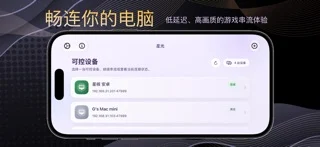
Streams and controls your own PC from iPhone or iPad, with Apple Pencil and virtual gamepad input.
健 耿 · Utilities · $2.99
iPhone screenshots
What’s New
Version 1.2.3 ·
- Added landscape swipe-to-look controls for the virtual gamepad, with adjustable sensitivity. - Improved virtual gamepad layout editing and saving, and fixed deleted controls reappearing. - Improved the editor toolbar and property panel on smaller screens.
App Store descriptionWritten by the developer.
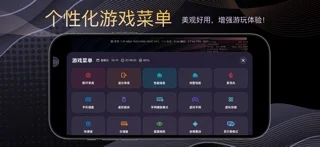
StarLight is a remote PC access and streaming utility designed for iPhone and iPad. It provides low-latency video streaming, Apple Pencil input, virtual controls, controller testing, and flexible display options. Whether you want to control your desktop, access installed apps and games, or stream content between your own devices, StarLight provides a convenient and customizable experience. Core Features Remote PC Access • Connect to and control your own PC • View and interact with your desktop remotely • Support for local and remote network connections • High frame rates, multiple resolutions, and portrait or landscape streaming • Suitable for remote desktop use, installed apps, games, and personal content Video and Audio Enhancements • High-performance Metal rendering • MetalFX upscaling, sharpening, and multiple scaling modes • HDR and multiple video codecs on supported devices • Adjustable video alignment, safe area, and orientation • Audio haptics that convert sound into tactile feedback • Performance statistics for frame rate, latency, and network conditions Apple Pencil and Touch • Apple Pencil input support • Follow Touch, Native Pen, and Mouse modes • Native Pen mode for compatible drawing, design, and productivity apps • Mouse mode turns Apple Pencil into a pointer • Multi-touch, trackpad, and mouse control options Virtual Controls and Gamepads • Support for external game controllers • Customizable on-screen buttons and virtual gamepads • Adjustable joystick range, sensitivity, opacity, and margins • Multiple controllers, motion input, and vibration feedback • Backup, import, and restore virtual control layouts Controller Testing • Real-time controller button detection • Test analog sticks, triggers, directional pads, and motion input • Visualized input response • Support for a wide range of game controllers • Helps diagnose controller connection, input, and vibration issues Common Uses • Access your PC from an iPhone or iPad • Remotely use apps, games, and personal content installed on your PC • Use Apple Pencil with compatible drawing and productivity software • Connect to a home or office PC over a local network • Access your own device while away from home • Test controller buttons, sticks, triggers, and input behavior Compatible host software must be configured on your own PC before use. Video quality, latency, and feature availability depend on your host performance, network conditions, and device capabilities. StarLight does not sell or provide digital content, games, or in-app game items. It is intended only for remotely accessing and controlling PCs owned or managed by the user.
StarLight - PC Streaming on iPhone Duo: FAQ
Is StarLight - PC Streaming optimized for iPhone Duo?
The developer or App Store listing mentions iPhone Duo support.
How much does StarLight - PC Streaming cost?
StarLight - PC Streaming costs $2.99 on the App Store.
More Utilities apps
See all ›
Measures angles to 0.1° using the iPhone Duo hinge, with target, match, and level tools.

Turns iPhone Duo into a bevel gauge that reads hinge angles, and works as a level on any iPhone.

Turns iPhone Duo into a realistic bi-fold wallet with card slots, cash, pen and receipt.

Turns the iPhone Duo hinge into an angle and reference toolkit, with a free bubble level on other iPhones.

Turns iPhone into a ruler, protractor, level and diameter gauge, and iPhone Duo into a live folding rule.

Measures the iPhone Duo hinge angle live, and serves as a level, protractor, slope meter and camera angle finder.