
iPhone 스크린샷
iPhone Duo 활용 방식
탁상 자세에서는 먼 쪽에 전사 내용을, 가까운 쪽에 조작과 Ask 입력란을 둡니다.
새로운 기능
버전 1.10.2 ·
• Ready for iPhone Duo: optimized for every pose, closed, laptop, book and flat open. Prop it on the table and the live transcript reads on the far half, with the controls and the Ask field near you • iPhone Duo, opened: the Actions tab now uses the phone layout, so the toolbar, the status row and the filter chips all fit, and an item's details open in a sheet • Tag filters always have a way out: a Clear chip at the start of the tag row, and when a tag hides everything the empty state says so and offers to clear it. On the Mac, Escape clears the tags • Fixed: the share sheet could open empty on the first export or backup of a session. Plus general polish and reliability fixes
개발자가 이 내용을 한국어로 제공하지 않았습니다.
App Store 설명개발자가 작성한 내용입니다.
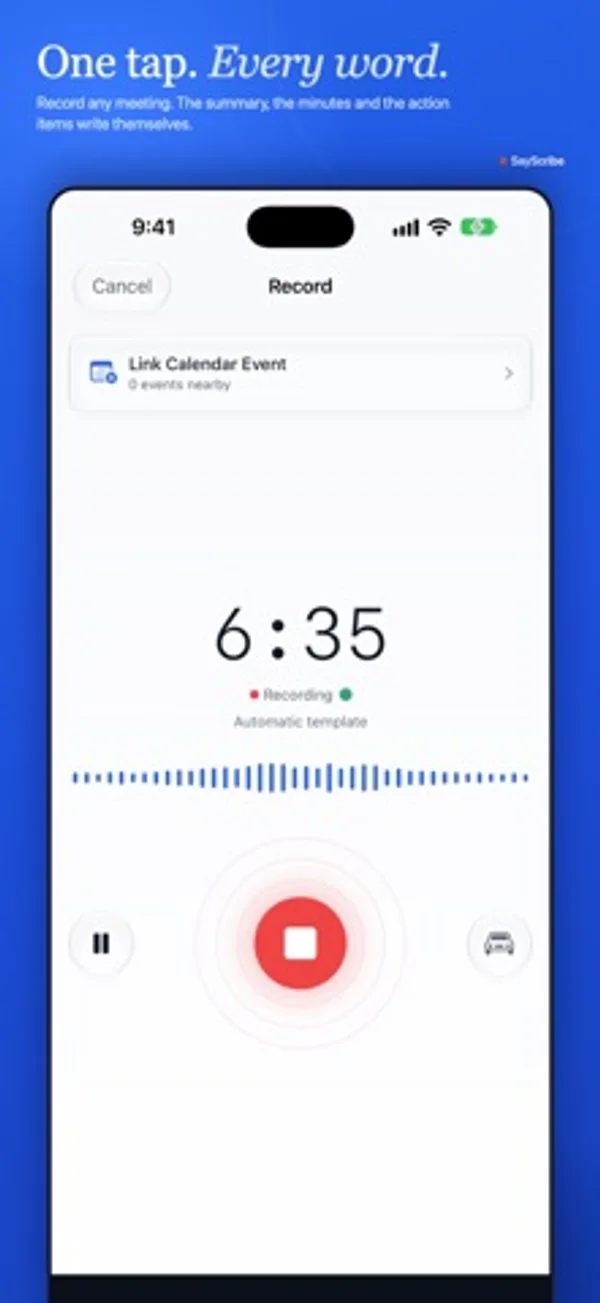
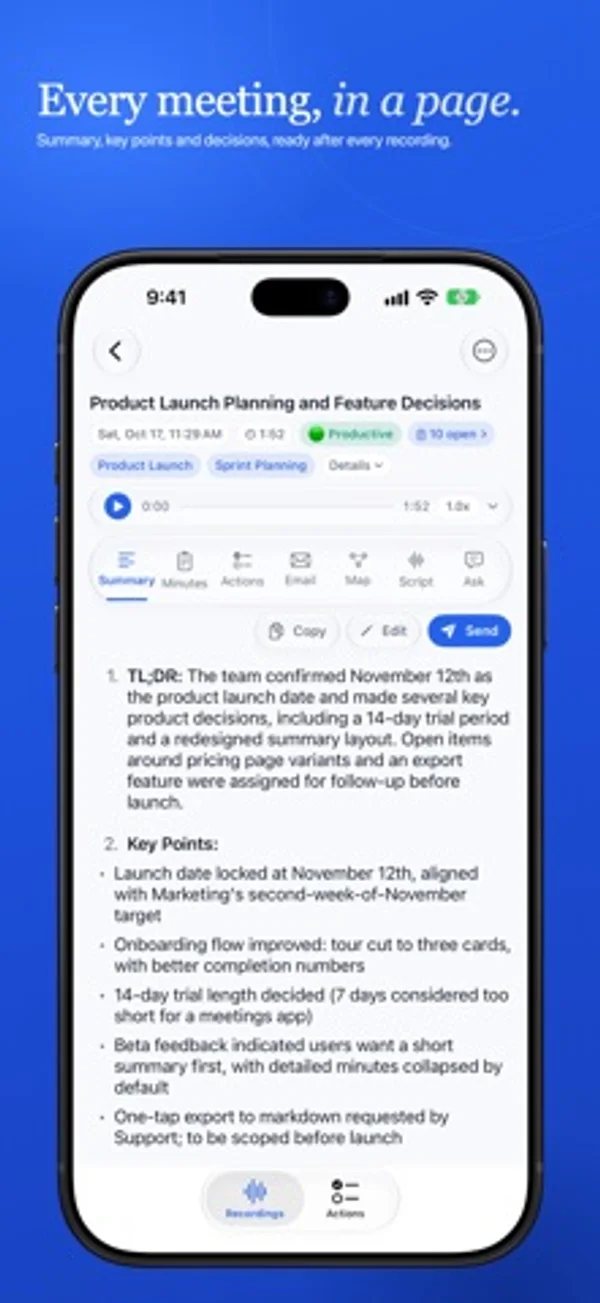
Never take notes in a meeting again. SayScribe™ records, transcribes and writes the summary, action items and follow-up email for you, privately, with nothing stored on our servers. RECORD & TRANSCRIBE • Instant record: tap to start, or choose a template • Favorite templates for one-tap recording • Live transcription preview as you record • Speaker detection, so you know who said what • 99 languages with automatic detection • Stop or pause AI processing • Siri and Shortcuts: start and stop recordings hands-free, or from Control Center and the Action button • Lock Screen & Dynamic Island: see and stop your recording without opening the app (iPhone) • Forgot-to-stop reminders if a recording runs long or goes quiet READY FOR iPHONE DUO • Every pose: closed, laptop, book and flat open • Prop it open on the table: the live transcript reads on the far half, with the controls and the Ask field near you SAYSCRIBE INSIGHTS • Smart summaries that capture what matters • Meeting templates for standups, 1:1s, client meetings, and more • Meeting minutes tailored to your meeting type • Action items with owners, due dates, and priority • Action item triage: assign, track, or dismiss several items at once • Ask: chat with any recording to get answers • Email drafts ready to send • Sentiment analysis and smart tags ACTION TRACKER • Organize work into Projects with areas, headings, and sub-tasks • My Day to plan what matters today • Quick Add: type naturally, SayScribe figures out the details • Track status • Saved Views to pin your favorite filters • Smart search • Home Screen & Lock Screen widgets (iPhone and iPad) • Daily Briefing with a morning summary of your agenda • Reminders so nothing slips through • Export to Apple Reminders or CSV SYNC ACROSS DEVICES • Your recordings, notes, and action items, everywhere • Free up space on one device, keep everything on another • Stored in your iCloud. We never see your data NOW ON MAC • Native macOS app, built for the way you already work • Capture mic and system audio to record Zoom, Google Meet, FaceTime, and Teams calls without bots • Menu-bar recording indicator with a live timer and one-click Stop & Save, even with the main window closed • Right-click context menus, keyboard shortcuts, and a full Settings panel ON THE GO (iPhone) • Car Mode: a simplified recording display for when you're driving • Large timer and controls, easy to glance at with your phone mounted EXPORT YOUR WAY • Audio export as M4A or WAV (Starter and above) • Save transcripts as text, PDF, HTML, or RTF • Print any list: export the Recordings or Actions view as a PDF or text file • Subtitle export (SRT) for content creators • Action items as CSV PERFECT FOR • Professionals: never miss an action item from client calls or team meetings • Students: capture every lecture, review key points before exams • Journalists: record interviews, get instant transcripts with speaker labels • Consultants: document client sessions, generate follow-up emails automatically • Anyone in meetings: less note-taking, more listening BUILT FOR PRIVACY • Audio deleted immediately after transcription • Audio retention controls: auto-delete after 7, 30, or 90 days • No human reviews your audio • No ads, no tracking, no data sold • No account required, ever PLANS • Free: record and transcribe, with a monthly allowance of AI notes • Starter: more AI notes, email drafts, smart tags, and audio export • Pro: everything SayScribe offers, with a free trial for new subscribers For paid plans, payment will be charged to your Apple Account at confirmation of purchase. Subscriptions automatically renew unless canceled at least 24 hours before the end of the current period. You can manage and cancel subscriptions in your Account Settings. Privacy Policy: https://sayscribe.app/privacy | Terms: https://sayscribe.app/terms
iPhone Duo에서의 SayScribe: 자주 묻는 질문
SayScribe은(는) iPhone Duo에 최적화되어 있나요?
네. SayScribe은(는) Duo 전용 설계 앱으로, 폴딩, Split View 또는 외부 디스플레이를 활용합니다. 2026년 10월 28일 확인(개발자 발표).
iPhone Duo에서 SayScribe은(는) 어떻게 보이나요?
탁상 자세에서는 먼 쪽에 전사 내용을, 가까운 쪽에 조작과 Ask 입력란을 둡니다.
SayScribe의 가격은 얼마인가요?
SayScribe은(는) App Store에서 무료로 다운로드할 수 있습니다.
다른 생산성 앱
모두 보기 ›
걸리는 시간별로 할 일을 분류하는 차분한 할 일 목록 겸 종이 스타일 플래너

타자기 키보드와 녹음된 키 소리, 캐리지 동작으로 글을 씁니다.

iPhone Duo의 두 디스플레이에 맞춘 레이아웃을 갖춘 작업·프로젝트 관리 앱

펼치면 메시지와 받은 편지함을 나란히 보여 주는 Readdle의 통합 받은 편지함

Cultured Code의 작업 관리 앱, iPhone Duo의 모든 자세에 맞게 재구성

iPhone Duo를 펼치면 열리는, 손글씨 느낌의 프라이빗 노트