
SayScribe
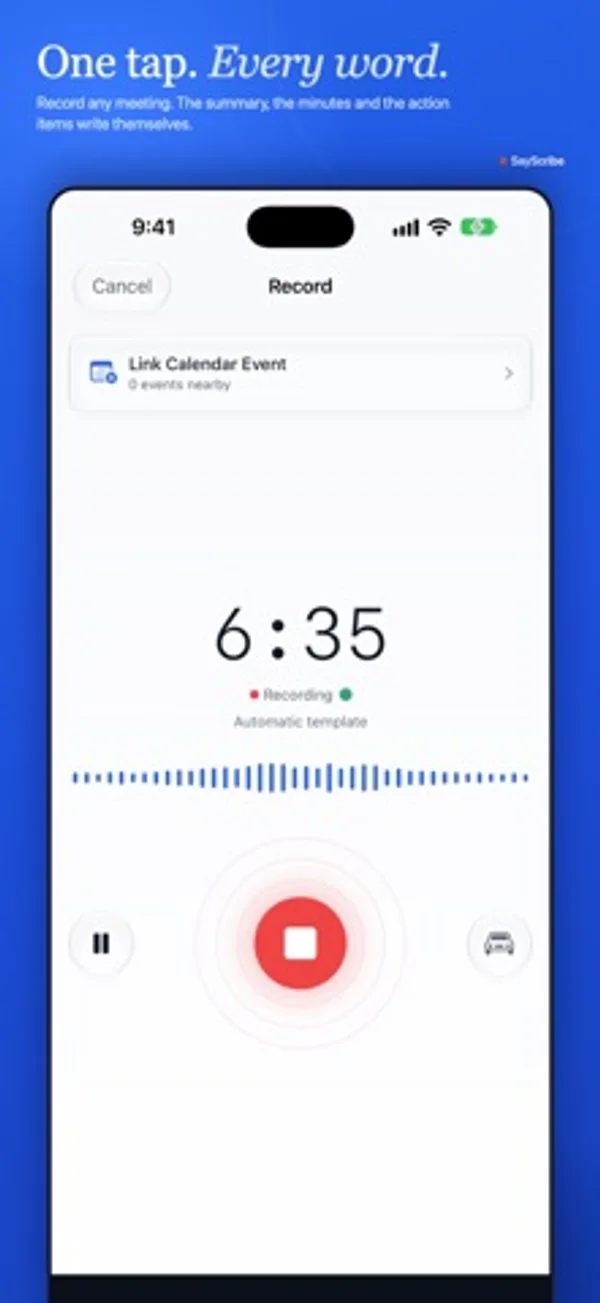
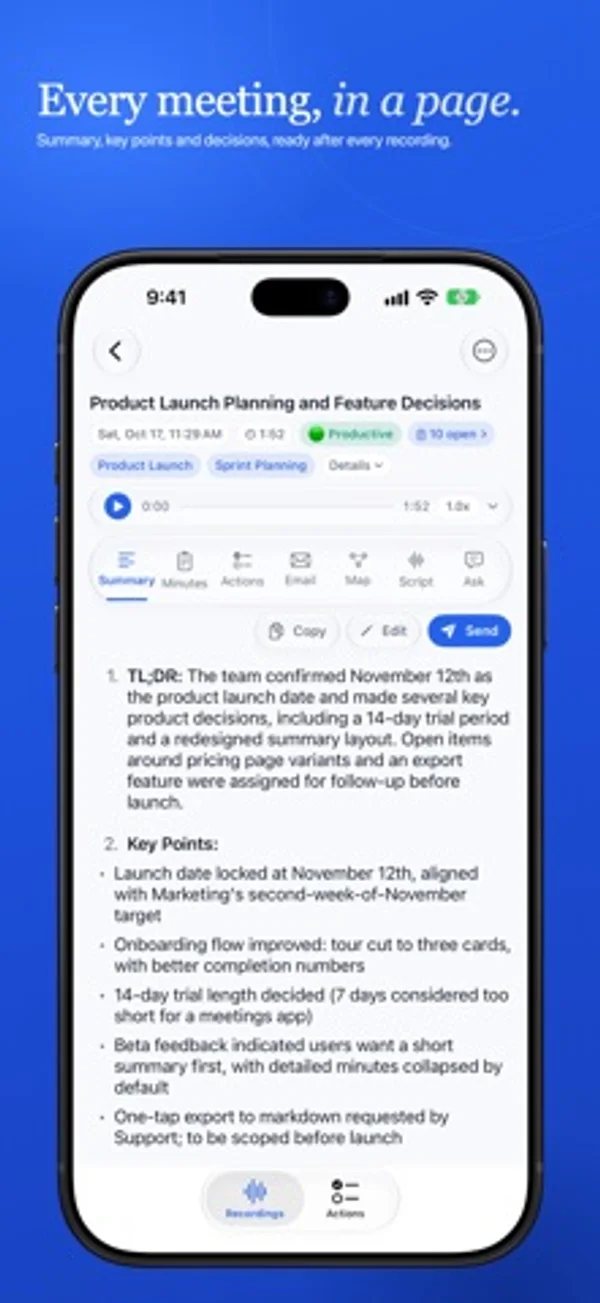
Record conversations and turn transcripts into summaries, action items and follow-up drafts.
Robert Frederique · Productivity · Free
iPhone screenshots
How it uses iPhone Duo
In tabletop use, the transcript occupies the far half while controls and the Ask field remain near the user.
What’s New
Version 1.10.2 ·
• Ready for iPhone Duo: optimized for every pose, closed, laptop, book and flat open. Prop it on the table and the live transcript reads on the far half, with the controls and the Ask field near you • iPhone Duo, opened: the Actions tab now uses the phone layout, so the toolbar, the status row and the filter chips all fit, and an item's details open in a sheet • Tag filters always have a way out: a Clear chip at the start of the tag row, and when a tag hides everything the empty state says so and offers to clear it. On the Mac, Escape clears the tags • Fixed: the share sheet could open empty on the first export or backup of a session. Plus general polish and reliability fixes
App Store descriptionWritten by the developer.
Never take notes in a meeting again. SayScribe™ records, transcribes and writes the summary, action items and follow-up email for you, privately, with nothing stored on our servers. RECORD & TRANSCRIBE • Instant record: tap to start, or choose a template • Favorite templates for one-tap recording • Live transcription preview as you record • Speaker detection, so you know who said what • 99 languages with automatic detection • Stop or pause AI processing • Siri and Shortcuts: start and stop recordings hands-free, or from Control Center and the Action button • Lock Screen & Dynamic Island: see and stop your recording without opening the app (iPhone) • Forgot-to-stop reminders if a recording runs long or goes quiet READY FOR iPHONE DUO • Every pose: closed, laptop, book and flat open • Prop it open on the table: the live transcript reads on the far half, with the controls and the Ask field near you SAYSCRIBE INSIGHTS • Smart summaries that capture what matters • Meeting templates for standups, 1:1s, client meetings, and more • Meeting minutes tailored to your meeting type • Action items with owners, due dates, and priority • Action item triage: assign, track, or dismiss several items at once • Ask: chat with any recording to get answers • Email drafts ready to send • Sentiment analysis and smart tags ACTION TRACKER • Organize work into Projects with areas, headings, and sub-tasks • My Day to plan what matters today • Quick Add: type naturally, SayScribe figures out the details • Track status • Saved Views to pin your favorite filters • Smart search • Home Screen & Lock Screen widgets (iPhone and iPad) • Daily Briefing with a morning summary of your agenda • Reminders so nothing slips through • Export to Apple Reminders or CSV SYNC ACROSS DEVICES • Your recordings, notes, and action items, everywhere • Free up space on one device, keep everything on another • Stored in your iCloud. We never see your data NOW ON MAC • Native macOS app, built for the way you already work • Capture mic and system audio to record Zoom, Google Meet, FaceTime, and Teams calls without bots • Menu-bar recording indicator with a live timer and one-click Stop & Save, even with the main window closed • Right-click context menus, keyboard shortcuts, and a full Settings panel ON THE GO (iPhone) • Car Mode: a simplified recording display for when you're driving • Large timer and controls, easy to glance at with your phone mounted EXPORT YOUR WAY • Audio export as M4A or WAV (Starter and above) • Save transcripts as text, PDF, HTML, or RTF • Print any list: export the Recordings or Actions view as a PDF or text file • Subtitle export (SRT) for content creators • Action items as CSV PERFECT FOR • Professionals: never miss an action item from client calls or team meetings • Students: capture every lecture, review key points before exams • Journalists: record interviews, get instant transcripts with speaker labels • Consultants: document client sessions, generate follow-up emails automatically • Anyone in meetings: less note-taking, more listening BUILT FOR PRIVACY • Audio deleted immediately after transcription • Audio retention controls: auto-delete after 7, 30, or 90 days • No human reviews your audio • No ads, no tracking, no data sold • No account required, ever PLANS • Free: record and transcribe, with a monthly allowance of AI notes • Starter: more AI notes, email drafts, smart tags, and audio export • Pro: everything SayScribe offers, with a free trial for new subscribers For paid plans, payment will be charged to your Apple Account at confirmation of purchase. Subscriptions automatically renew unless canceled at least 24 hours before the end of the current period. You can manage and cancel subscriptions in your Account Settings. Privacy Policy: https://sayscribe.app/privacy | Terms: https://sayscribe.app/terms
SayScribe on iPhone Duo: FAQ
Is SayScribe optimized for iPhone Duo?
Yes. SayScribe is Built for Duo: it uses the fold, Split View or the outer display. Verified on October 28, 2026 (Developer statement).
What does SayScribe look like on iPhone Duo?
In tabletop use, the transcript occupies the far half while controls and the Ask field remain near the user.
How much does SayScribe cost?
SayScribe is free to download on the App Store.
More Productivity apps
See all ›
Calm to-do list and paper-style planner that sorts tasks by how long they take

Write with a typewriter-style keyboard, recorded key sounds and carriage-return actions.

Task and project management with layouts for both iPhone Duo displays

Unified inbox from Readdle with message and inbox side by side when unfolded

Task manager from Cultured Code, reshaped for every iPhone Duo pose

A private handwriting-style notebook that opens when you unfold iPhone Duo