
Biblio.ink: 3D Bookshelf
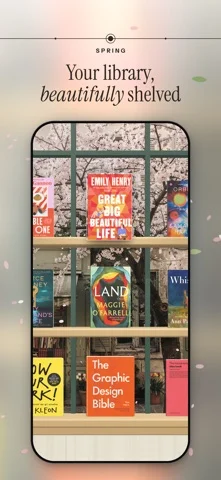
Puts your ebooks and physical books on 3D shelves you can browse and read.
groov creator limited · Reading & News · Free
iPhone screenshots
What’s New
Version 1.11.11 ·
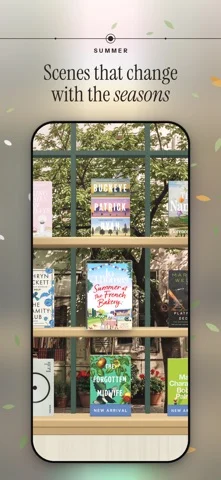
New covers arrive with a little light. • Change a book’s front, spine or back in the designer and the new face appears on the book in your hand, with a sweep of light and gold dust. With Reduce Motion on, it glows softly instead. • The designer can now photograph the front and back covers, as it does the spine. Hold the book inside the frame and the picture is straightened for you. • A shelf someone shares with you can open in an App Clip, without installing Biblio. • Turning a page with the paper curl in an EPUB no longer shows the next page before it has arrived. • On a shelf of several rows, Find takes the book it finds down and holds it above the keyboard. • The Shelf widget is sharper in the tall size, and every size shows your books with the room above them. • The Four seasons preview ends on 31 October. From 1 November it comes with a Biblio plan, but if it’s on your shelf then, it stays for as long as you keep it there.
App Store descriptionWritten by the developer.
Your unified library in 3D, your physical books and ebooks live together. Drop in an EPUB or PDF and watch it become a hardcover you can pick up, browse, and read. Biblio turns a folder of files into a library you actually want to visit. Every book stands on a real 3D shelf, spine, cover, and page edges you can reach in and pick up, turn over, and start reading. A pile of downloads becomes a collection you browse the way you browse a bookshelf at home. One library, every kind of book Your ebooks and your physical books live side by side. Scan a barcode, photograph a whole shelf at once, search by title or author, or add a book by hand. However it arrives, it stands on the same shelf. See your collection, your way • Shelf: your whole library on beautiful 3D shelves; pinch to see every book at once • Cascade: flip through your books like flipping through records • Map: Your library on a world map: books pin to the places they're about, and tapping a place fans out its covers. Pan, zoom, and switch between Map and Constellation in the Graph view. • Constellation: a quiet map of how your books connect to one another • List: search, sort, and organize in a tap A reader that gets out of the way Clean typography, smooth page turns, and a layout built for long reading. PDFs support markup with Apple Pencil. Your place is always saved. Share a shelf with anyone Publish a shelf to your own page at biblio.ink and send the link to a friend — no account required to view. Yours, and private Biblio is local-first: your library lives on your device. Turn on iCloud to keep it in sync across iPhone, iPad, and the web, privately. Biblio is for people who love books — not just reading them, but keeping them, arranging them, and coming back to them. Terms: https://biblio.ink/terms
Biblio.ink: 3D Bookshelf on iPhone Duo: FAQ
Is Biblio.ink: 3D Bookshelf optimized for iPhone Duo?
The developer or App Store listing mentions iPhone Duo support.
How much does Biblio.ink: 3D Bookshelf cost?
Biblio.ink: 3D Bookshelf is free to download on the App Store.
More Reading & News apps
See all ›
Simulates real paper folding: drag fold lines freely or follow guided steps to fold a crane, plane and chick.

Schedules flashcards by how much of the answer you revealed, without rating difficulty.

An RSS reader with built-in summaries that reshapes as the iPhone Duo folds

RSS and news reader that switches layouts as you fold and unfold

Reads and narrates 26 classic books with a story world shown beside each page.

A talking creature dex that reads entries aloud and scans toys with the camera.