
Dúo Calculator
Calculate with basic, scientific and programmer keypads, unit conversion and reusable history.
Alejandro Hernandez Mitre · Utilities · $1.99
iPhone screenshots
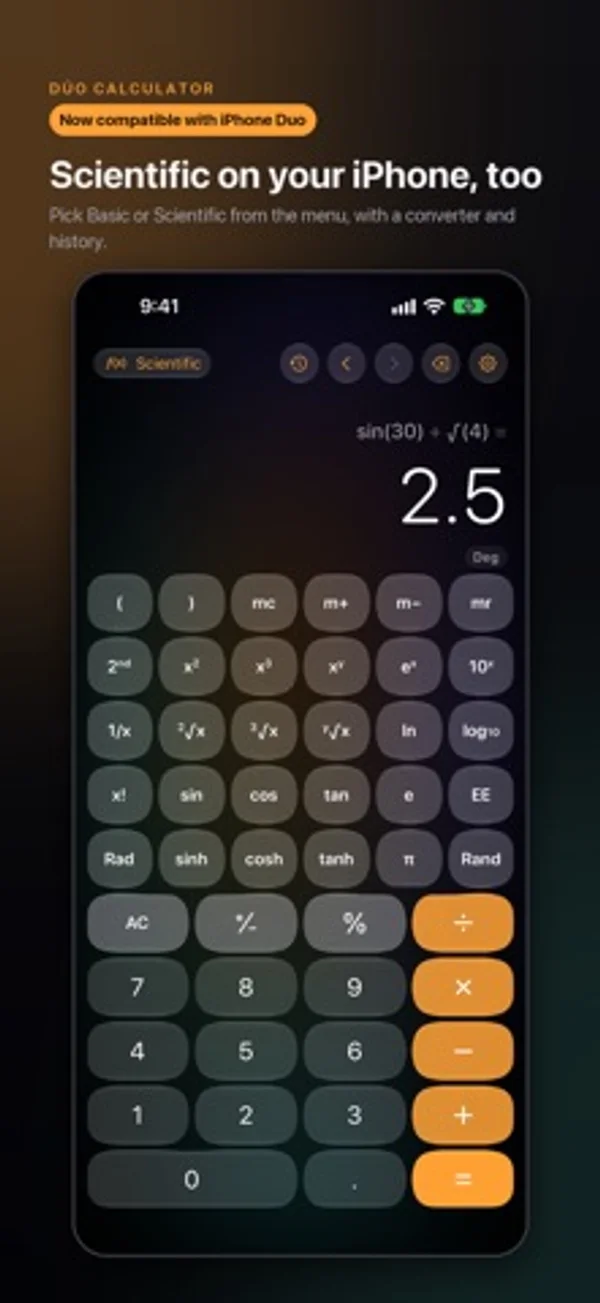
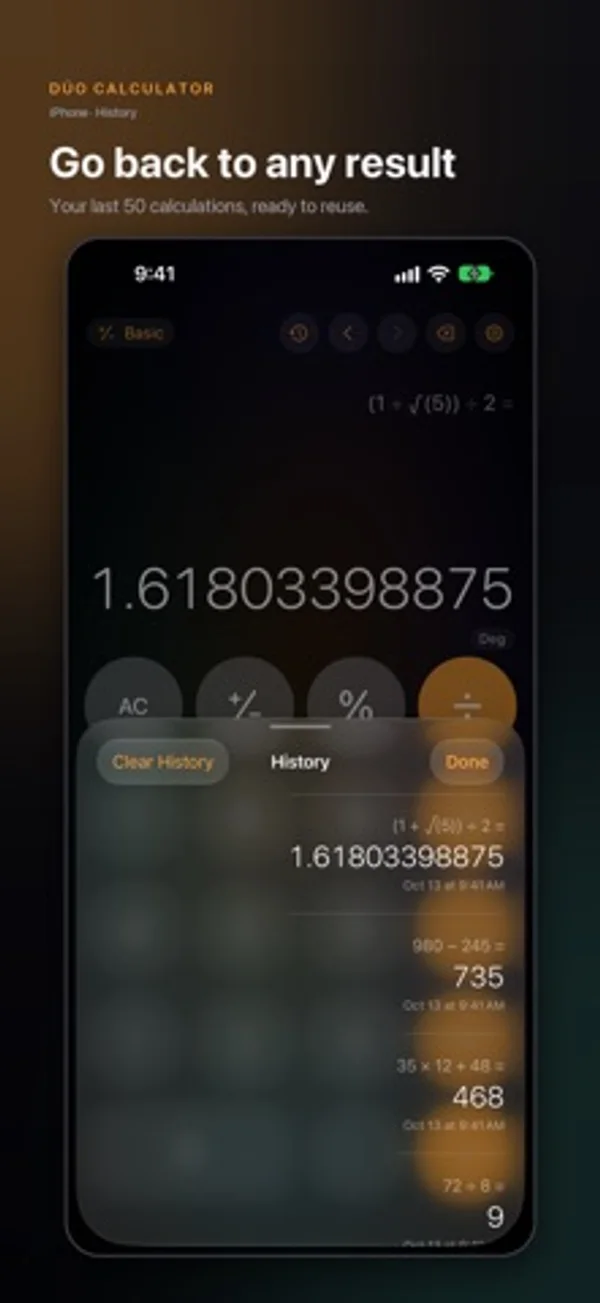
How it uses iPhone Duo
Closed shows basic keys; unfolded adds scientific tools. Half-open places the result above the keypad, while book mode splits keys around the fold.
What’s New
Version 2.0.0 ·
LiquidCalculator is now Dúo Calculator: compatible with and optimized for iPhone Duo. • On iPhone Duo: folded it's a basic calculator; unfolded, a full scientific one with programmer mode and a unit converter. Half open, the result sits above the fold. • Scientific mode on your iPhone, too: pick it from the menu or turn your phone. • Calculation history: tap a result to use it again. • Unit converter on every iPhone. • New design and a high-precision math engine. History from the previous version isn't shown in this version.
App Store descriptionWritten by the developer.
Now compatible with iPhone Duo. LiquidCalculator is now Dúo Calculator: fold your iPhone Duo and it's a basic calculator; unfold it and it becomes a full scientific calculator. On any iPhone: a basic or scientific keypad, a unit converter and your calculation history, with a precise math engine. No ads, no account and no in-app purchases. ONE CALCULATOR, TWO SCREENS • Folded: a basic calculator with big keys. In landscape, a compact scientific keypad appears (you can turn it off in Settings). • Unfolded: a 10 × 5 scientific keypad with every function in view; with the screen flat, also programmer mode and a unit converter. • Half open like a laptop, the result sits above the fold and the keypad below it. Open like a book, the keypad splits across both sides of the fold. • Fold or unfold in the middle of a calculation and your work stays put: keys slide to their new places and the new ones appear. • It also adapts to Split View on the inner display. ON YOUR IPHONE • Pick Basic or Scientific from the menu, in portrait or landscape. • Unit converter and History on every model. • iPhone SE and accessibility text sizes keep the big basic keys. HISTORY • Your last 50 calculations, newest first • Tap a result to use it again; swipe to delete one, or clear them all • On an unfolded iPhone Duo it opens in a panel that never crosses the fold A REAL SCIENTIFIC CALCULATOR • Trigonometry in degrees or radians, inverse and hyperbolic functions • ln, log10, log2 and logarithms in any base • Powers, roots of any degree, factorial, 1/x, π, e and EE notation • Parentheses, memory (mc, m+, m−, mr) and the 2nd key • Live result as you type, plus cursor editing: tap the expression to fix any point It does not include graphing, matrices or statistics. EXACT UNDER THE HOOD Basic operations use exact fractions: 0.1 + 0.2 gives 0.3 and 1 ÷ 3 × 3 gives 1. Functions such as sin, ln or e^x are computed with 60 digits of precision and the display shows up to 16. Invalid operations, such as dividing by zero or tan 90°, show a clear error instead of a wrong answer. The engine is checked against an independent reference model on hundreds of test cases. PROGRAMMER MODE (large screens, such as an unfolded iPhone Duo) • 8, 16, 32 and 64-bit integers, signed or unsigned • BIN, OCT, DEC and HEX at once, with a bit grid you can tap • AND, OR, XOR, NOR, NOT, shifts, rotations, 1's and 2's complement, mod UNIT CONVERTER • 87 units in 11 categories: length, mass, temperature, area, volume, speed, time, data, energy, pressure and angle • Swap units with one tap, pull in the calculator's value or send the result back to it • Works offline; currencies are not included YOUR WAY • Light, dark or system theme, with optional pure OLED black • Four accent colors: amber, indigo, mint and graphite • Liquid Glass design; haptics and the aurora background are optional • Copy and paste, plus hardware keyboard support • English and Spanish, with VoiceOver labels; respects Reduce Motion, Reduce Transparency and Increase Contrast PRIVATE BY DESIGN • Collects no data: no account, no ads, no analytics, no tracking • Never uses the network: the app never sends your calculations anywhere • Settings, your last calculation and your History are stored on the device (and in its backups) and removed from it with the app COMPATIBILITY • Now compatible with and optimized for iPhone Duo, on both the outer and the inner display. • Runs on any iPhone with iOS 26 or later. Programmer mode needs a large screen, such as the inner display of iPhone Duo. • iPhone only. Support and feedback: alex@nextechia.dev iPhone and iPhone Duo are trademarks of Apple Inc. This app is independent and is not affiliated with Apple.
Dúo Calculator on iPhone Duo: FAQ
Is Dúo Calculator optimized for iPhone Duo?
Yes. Dúo Calculator is Built for Duo: it uses the fold, Split View or the outer display. Verified on October 29, 2026 (Developer statement).
What does Dúo Calculator look like on iPhone Duo?
Closed shows basic keys; unfolded adds scientific tools. Half-open places the result above the keypad, while book mode splits keys around the fold.
How much does Dúo Calculator cost?
Dúo Calculator costs $1.99 on the App Store.
More Utilities apps
See all ›
Watch the folding angle change as you open and close the phone.

View live angle measurements and try target-angle challenges.

Learn Unix permissions with explanations, practice questions and certification-style exams.

Plan conduit bends with calculators for offsets, saddles and other pipe layouts.

A pocket-watch clock with eight dial styles, countdown timers and a completion ledger.

Measures angles to 0.1° using the iPhone Duo hinge, with target, match, and level tools.