
Dystopia Camera − 1000 Years
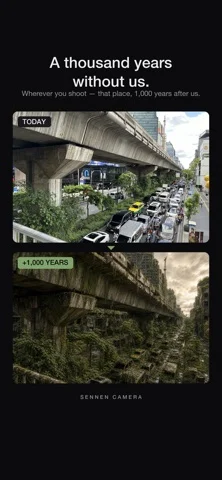
Transforms your photos into scenes of the world 1,000 years after humans vanished.
Norihiro Otsuki · Creative · Free
iPhone screenshots
What’s New
Version 1.4 ·
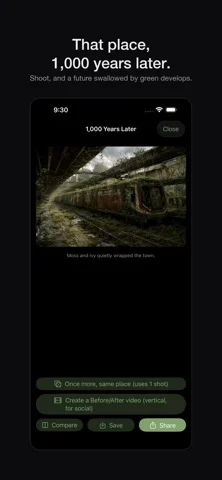
Now supports iPhone Duo. - On the large unfolded screen, see "Today" and "1,000 years later" side by side - Switch between Side by Side and Slider with one tap - Cleaner result screen with simpler buttons and labels
App Store descriptionWritten by the developer.
Your daily street corner, your commute crossing, that view from your trip — one tap of the shutter turns it into the world 1,000 years after humans vanished. SENNEN CAMERA keeps the exact framing of your photo while buildings sink under moss, trees break through the roads, and a quiet green world takes over — a future that might have been. ■ Shoot like you always do The app opens straight into the viewfinder. Pick a lens (ultra-wide / wide / telephoto) and press the shutter. You can also transform photos from your library. ■ A different millennium, every shot A herd of deer? Cherry blossoms in full bloom? Or something else — every transformation is different, and every encounter is collected in your field guide. ■ Shoot at night, and the stars come back With every city light gone, the Milky Way spreads across the night sky of the far future. ■ Share as a Before/After video Export a vertical video that switches from today to 1,000 years later, ready for TikTok, Instagram and X. ■ 3 free shots Try it on your own street first. * All images are fictional, AI-generated artwork. They are not predictions about any real place.
Dystopia Camera − 1000 Years on iPhone Duo: FAQ
Is Dystopia Camera − 1000 Years optimized for iPhone Duo?
The developer or App Store listing mentions iPhone Duo support.
How much does Dystopia Camera − 1000 Years cost?
Dystopia Camera − 1000 Years is free to download on the App Store.
More Creative apps
See all ›
Turns iPhone or iPad into a film slate that claps, syncs, and logs takes.

Draw on one half of the Duo, fold it shut, then reopen to reveal a mirrored picture.

Make folded inkblot prints with droppers, folding and rubbing, then save or share each print.

Turns your iPhone into an instant camera that prints framed photos you can caption and keep.

Drawing and painting app with custom brushes and unlimited layers

Record with the front and back cameras at the same time