
Liftr Workout & Gym Planner
Plans workouts and journals sets, supersets and timed exercises.
Karan Pandya · Health & Fitness · Free
iPhone screenshots
What’s New
Version 5.1.3 ·
Bug fixes
App Store descriptionWritten by the developer.
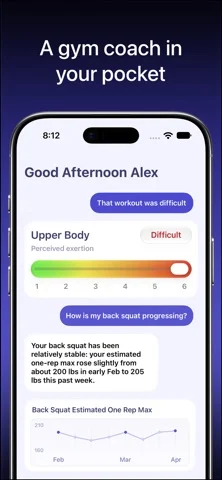
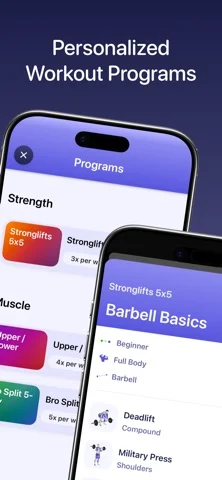
Liftr is the best workout app to help you build muscle and get stronger: - Custom, personalized workout programs to hit your goals. Browse from over 30+ popular workout programs or create your own using Liftr Intelligence - Share your workouts and personal records (PRs) with friends and family - Choose from a database of 500+ exercises with demonstrations and step-by-step instructions, or add your own custom exercises - A refined journal to track your sets, supersets, time-based exercises like Planks, and more. Specify between Warmups and different kinds of sets, including more advanced types like Myo-Reps, and more! - View progress for exercises and strength over time with graphs, charts, and personal records built-in - Curate your workouts based on the muscles you want to target and choose from over 40+ different supported equipment - Apple Health Integration: Liftr lets you see health metrics in your journal, and also saves workouts from Apple Watch to Apple Health (including tracking heart rate, calories burned, and duration) - Notifications for planned workouts and rest timers - Add physique photos and view your progress over time - iCloud backup support, Custom App Icons, rest timer, and more! - Use Siri AI to search for your workouts, get insights into your training, and more! - Customize your home screen with widgets to improve your workouts and quickly access your stats! - Live activities to track workouts even when you leave the app - Quickly start a workout from the lock screen or Control Center For Liftr Pro members: - Introducing Liftr Coach, your own personal AI coach that knows you and can help you meet your fitness goals - Liftr Coach can create custom workouts and programs for you, make recommendations by analyzing your history and goals, answer your questions, and more! - Coach is completely secure, no data is ever shared with third parties, and works on all iPhones with Apple Intelligence - Create or browse from popular workout programs - Liftr AI, with new features such as AI generated workouts, health and fitness insights, and insights for your favorite lifts - Track full strength training workouts on Apple Watch - View stunning 3D exercise animations and photos - Step by step exercise instructions - Create your own customized dashboard with charts to track progress - View per-exercise charts for strength, volume, and more - Create re-usable workout templates for your routines - Track body measurements - Add physique photos and track your progress over time - Export your data Terms of use: https://www.apple.com/legal/internet-services/itunes/dev/stdeula/
Liftr Workout & Gym Planner on iPhone Duo: FAQ
Is Liftr Workout & Gym Planner optimized for iPhone Duo?
The developer or App Store listing mentions iPhone Duo support.
How much does Liftr Workout & Gym Planner cost?
Liftr Workout & Gym Planner is free to download on the App Store.
More Health & Fitness apps
See all ›
Meditation timer with interval bells, soundscapes, streaks and Apple Health mindful minutes.

A water tracker with two-column layouts on the open iPhone Duo

Recovery, exertion and workout insights from your Apple Watch data

Builds adaptive workout plans and guides each set with a conversational coach.

Listens while you sleep to detect snoring and score sleep quality, with wake missions.

Log workouts and see trained muscles light up on a live muscle map.