
Snapling: Digital Photo Albums
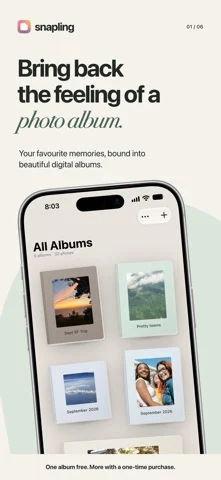
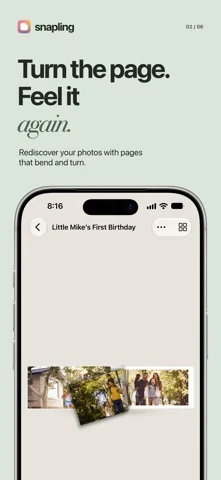
Turns your photos into flip-through digital albums with covers, layouts and page curl.
Vedantha Kartheek Thirumala Sreenivasan · Creative · Free
iPhone screenshots
What’s New
Version 2.2 ·
Version 2.2 contains no functional changes from the previously approved version 2.1. This build is provided solely to publish updated US App Store metadata: the description, subtitle, and keywords. The app’s features and behavior remain unchanged.
App Store descriptionWritten by the developer.
Turn photos you already have into a digital album you can flip through like a real book. Import a Photos album or select photos and videos, choose a cover and page layout, then revisit your memories one page at a time. Start free with one album and up to 50 photos and videos combined. Every feature below is included; the optional Snapling Unlimited one-time purchase removes those limits. No subscription and no Snapling account required. Make it your own: • Choose from four album styles • Turn pages with a realistic page curl • Change album covers and page layouts • Add, remove and reorder photos and videos • Rename albums at any time • Lock private albums with Face ID or your device passcode • Export albums as PDFs for sharing or printing Private and in sync: Album data and imported media are stored on your device and in your private iCloud database. Your albums sync across iPhone and iPad when both use the same iCloud account. No Snapling account is required. IN-APP PURCHASE AND LEGAL INFORMATION All the features above are included in the free version for one album containing up to 50 photos and videos in total. Snapling Unlimited is an optional, one-time in-app purchase that removes the one-album and 50-item limits. It is not a subscription. Purchases are processed by Apple. Restore Purchase is available in Snapling Settings. Privacy Policy: https://snapling.netlify.app/privacy Terms of Service: https://snapling.netlify.app/terms Support: https://snapling.netlify.app/support
Snapling: Digital Photo Albums on iPhone Duo: FAQ
Is Snapling: Digital Photo Albums optimized for iPhone Duo?
The developer or App Store listing mentions iPhone Duo support.
How much does Snapling: Digital Photo Albums cost?
Snapling: Digital Photo Albums is free to download on the App Store.
More Creative apps
See all ›
Turns iPhone or iPad into a film slate that claps, syncs, and logs takes.

Draw on one half of the Duo, fold it shut, then reopen to reveal a mirrored picture.

Make folded inkblot prints with droppers, folding and rubbing, then save or share each print.

Turns your iPhone into an instant camera that prints framed photos you can caption and keep.

Drawing and painting app with custom brushes and unlimited layers

Record with the front and back cameras at the same time