iPhone Duo Games: 5 Picks That Use the Fold
An illustrated guide to five iPhone Duo games: 10 developer screenshots, practical play loops, fold interactions, free limits and buying advice.
Published · 11 min read
On this page
- Start with the kind of play you enjoy
- 1. Hingami: put the paper crease under the hinge
- 2. Marbles Unhinged: steer the ball and reshape its route
- 3. Two Fold: look for the answer in another world
- 4. Halves: the other player should not see the answer
- 5. Toastie: decide when to open the lid
- Which one should you download first?
- Questions to settle before downloading
A larger screen is only the beginning of a good iPhone Duo game. A hinge can become a crease in paper, a way into another world, or a screen that keeps one player’s answer out of the other player’s sight.
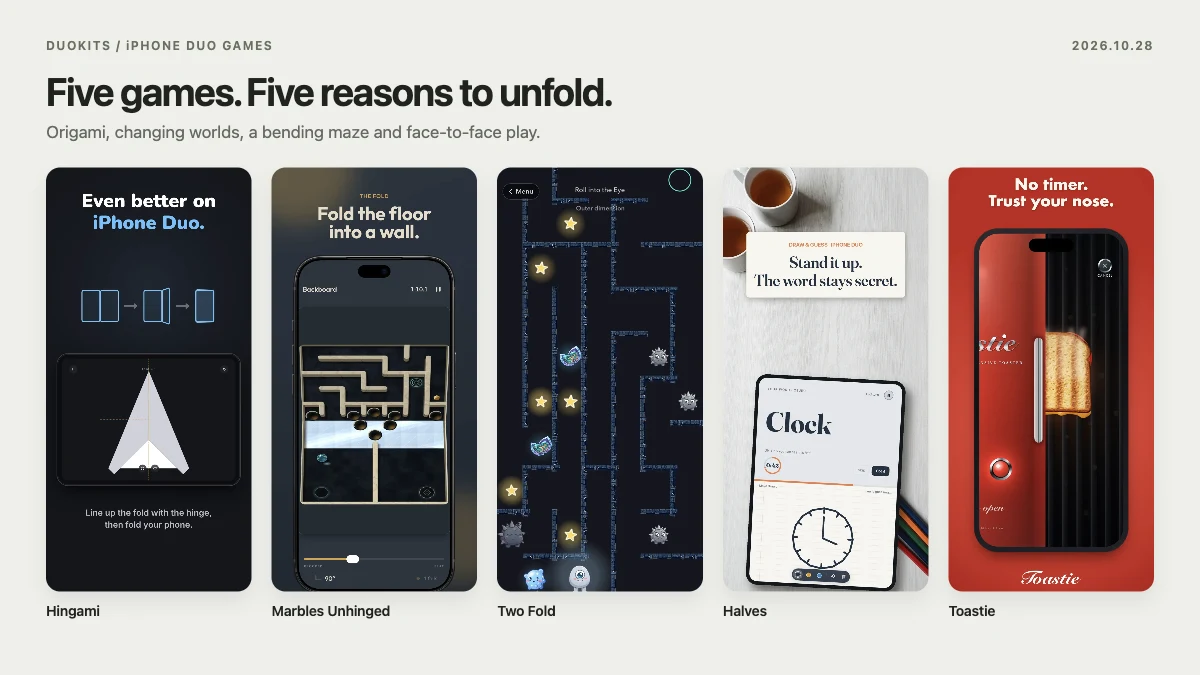
These five picks are organised around what you actually want to play: quiet origami, a moving marble maze, a character adventure, a shared-device game night, or a short cooking challenge. Each has two high-resolution developer images, with an explanation of the play loop, the fold’s role and the purchase conditions.
Descriptions, version notes and US App Store prices were checked on October 28, 2026. This is source-based editorial selection, not a device performance review. Images retain their original interfaces and English promotional copy; captions explain what they show. Select an image to open the full-resolution version.
Start with the kind of play you enjoy
| Game | Your main activity | The fold’s job | Best starting point for |
|---|---|---|---|
| Hingami | Aligning creases and shaping paper | Turns a paper crease into a physical fold | Quiet spatial puzzles without a countdown |
| Marbles Unhinged | Steering a marble through mechanisms | Changes ramps, walls and drops | Motion and spatial judgement |
| Two Fold: Uno’s Quest | Helping Uno through a continuing adventure | Switches inner and outer worlds | Characters, obstacles and progression |
| Halves: Games for Two | Drawing, giving clues and competing | Hides information from the other player | Two people across one device |
| Toastie | Preparing and grilling a sandwich | Opens and closes the toaster lid | A short, clear cooking objective |
If you are undecided, compare Hingami with Halves first. One makes folding an input; the other changes who can see which information. The wider iPhone Duo games directory offers more genres.
1. Hingami: put the paper crease under the hinge
The appeal: origami, spatial reasoning and time to think.
Hingami starts with a square sheet and a sequence of guided creases. You work out how to position the paper, which section should move and how its layers will sit after the next fold. The listing describes 20 handcrafted levels and six unlockable paper colours. This is about understanding a shape, rather than beating someone else’s tapping speed.
On a phone, swipe for the second image. Select an image for full resolution.
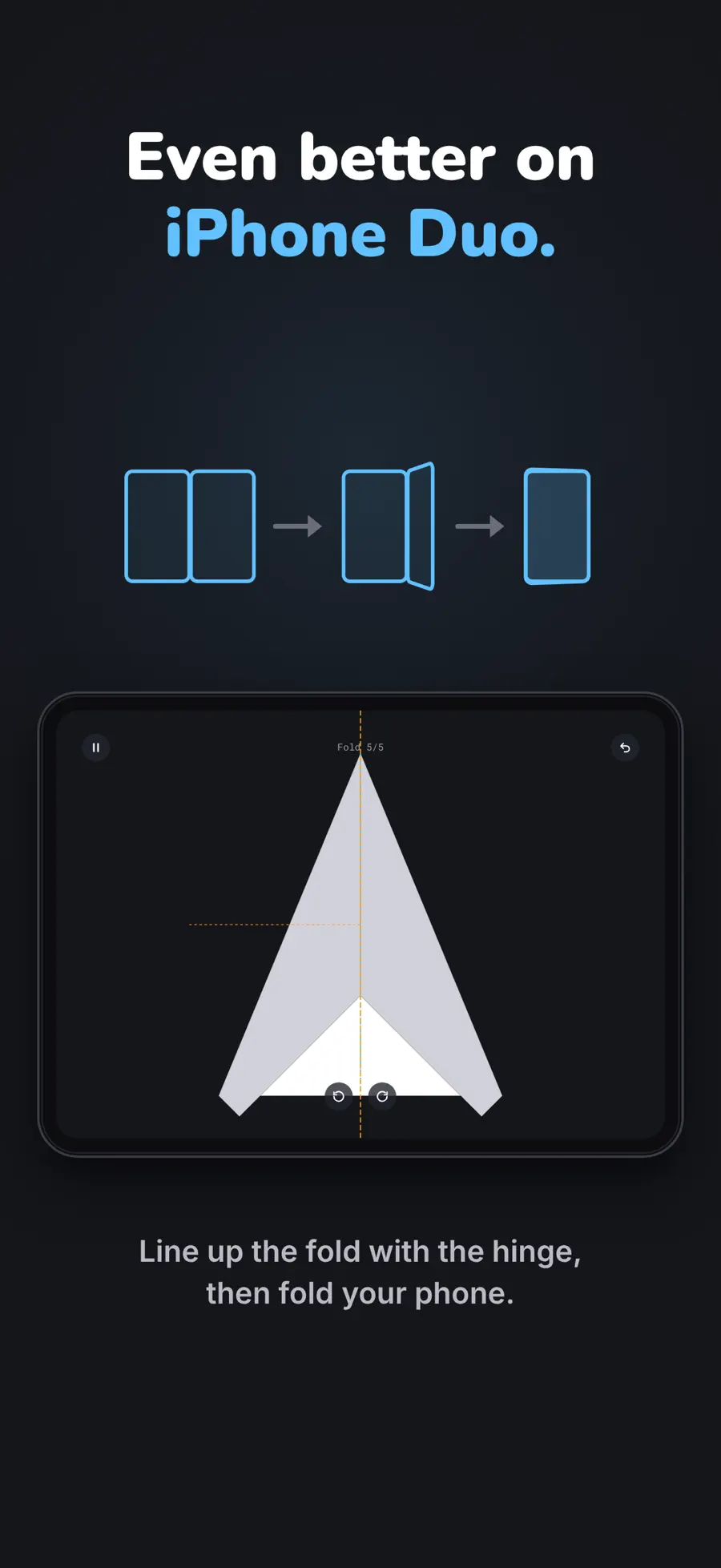
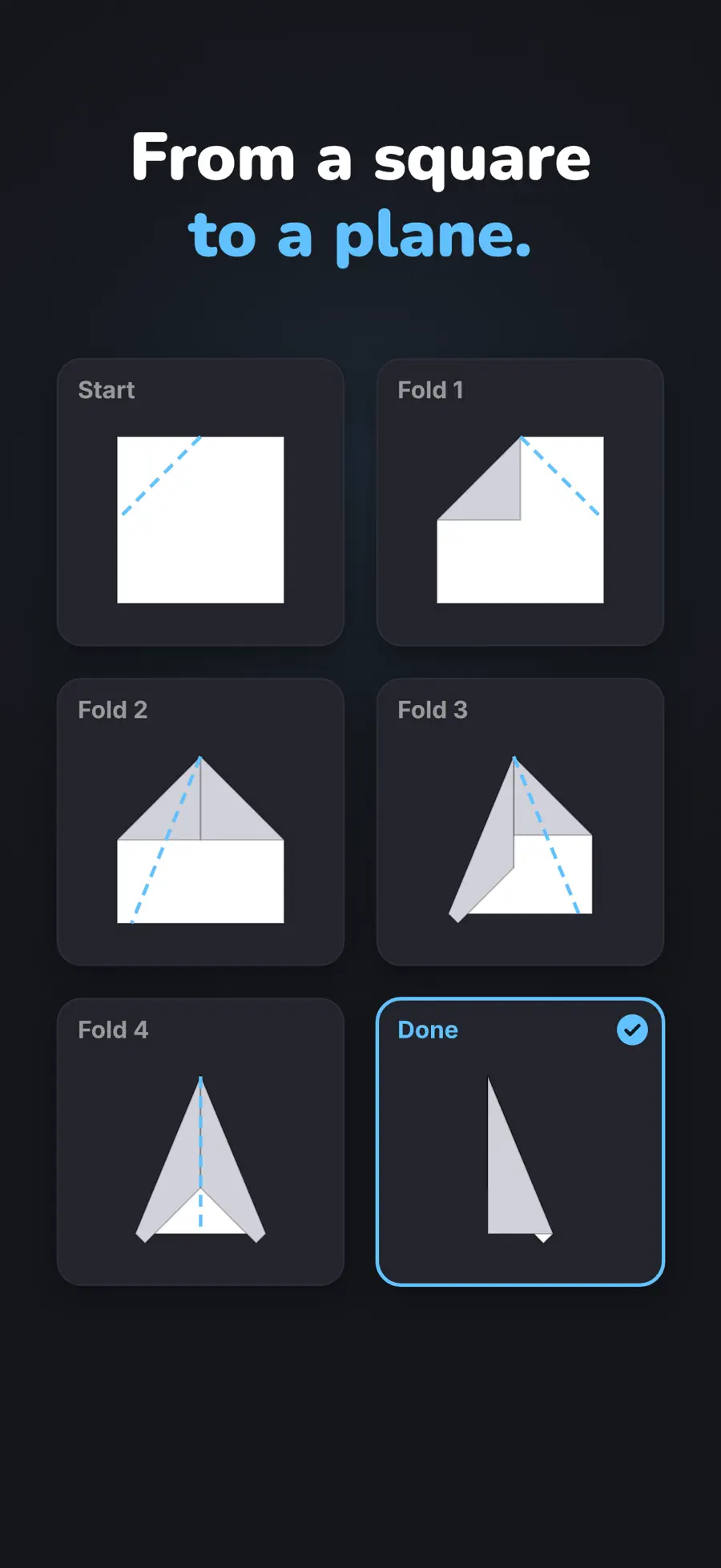
What happens during a fold?
Look at the current crease, align it with the hinge and physically fold the device. As layers accumulate, the next line involves different edges and surfaces. The Duo image illustrates the hinge alignment; the second image breaks a square-to-paper-plane transformation into successive stages. Together, they explain the rhythm more clearly than a finished shape alone.
On an ordinary iPhone, dragging the paper replaces the physical movement. The developer says every level remains playable there. That makes the core question straightforward: do you enjoy solving the paper puzzle itself? The hardware interaction adds a relationship between the object in your hand and the object on screen.
Why choose it for a quieter session?
The listing specifies no timer or lives, offline play, VoiceOver and Reduce Motion support. Those are useful details for someone who wants to stop, inspect a crease and think. If you are looking for competition, a continuing story or a large randomised challenge, a small collection of handcrafted origami puzzles has a different emphasis.
Checked version 0.3.0 also places level details beside the level list when unfolded, with a way to continue playing. That is a second use of the screen: browsing retains context, while the puzzle uses the hinge as input.
2. Marbles Unhinged: steer the ball and reshape its route
The appeal: a physical maze whose board can change shape.
A conventional marble maze asks you to tilt a board. Marbles Unhinged adds another variable: the hinge changes the board itself. You judge where the ball should roll and whether the surface ahead should be flat, a ramp or a wall. The on-screen angle control visible in the promotional images also illustrates how the rules work on a conventional phone.
On a phone, swipe for the second image. Select an image for full resolution.
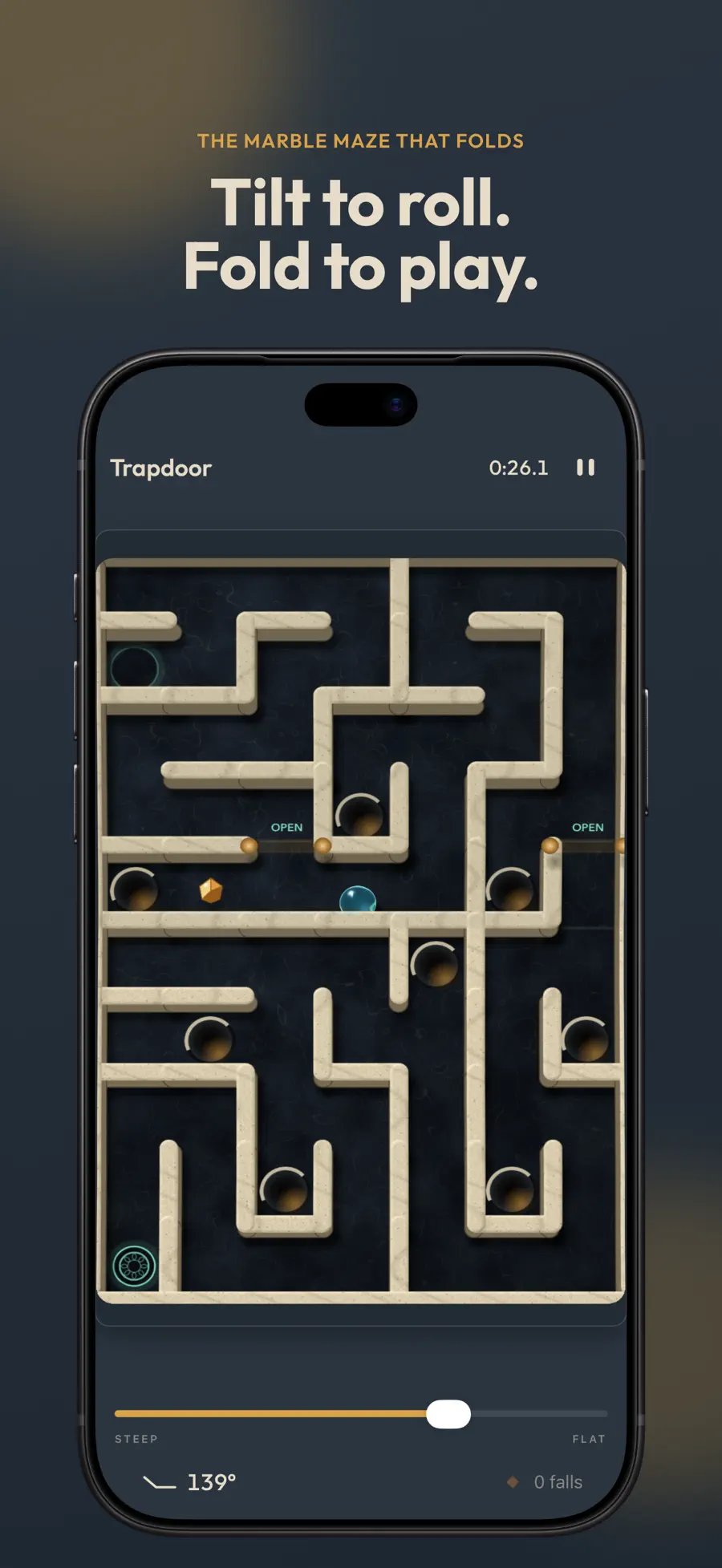
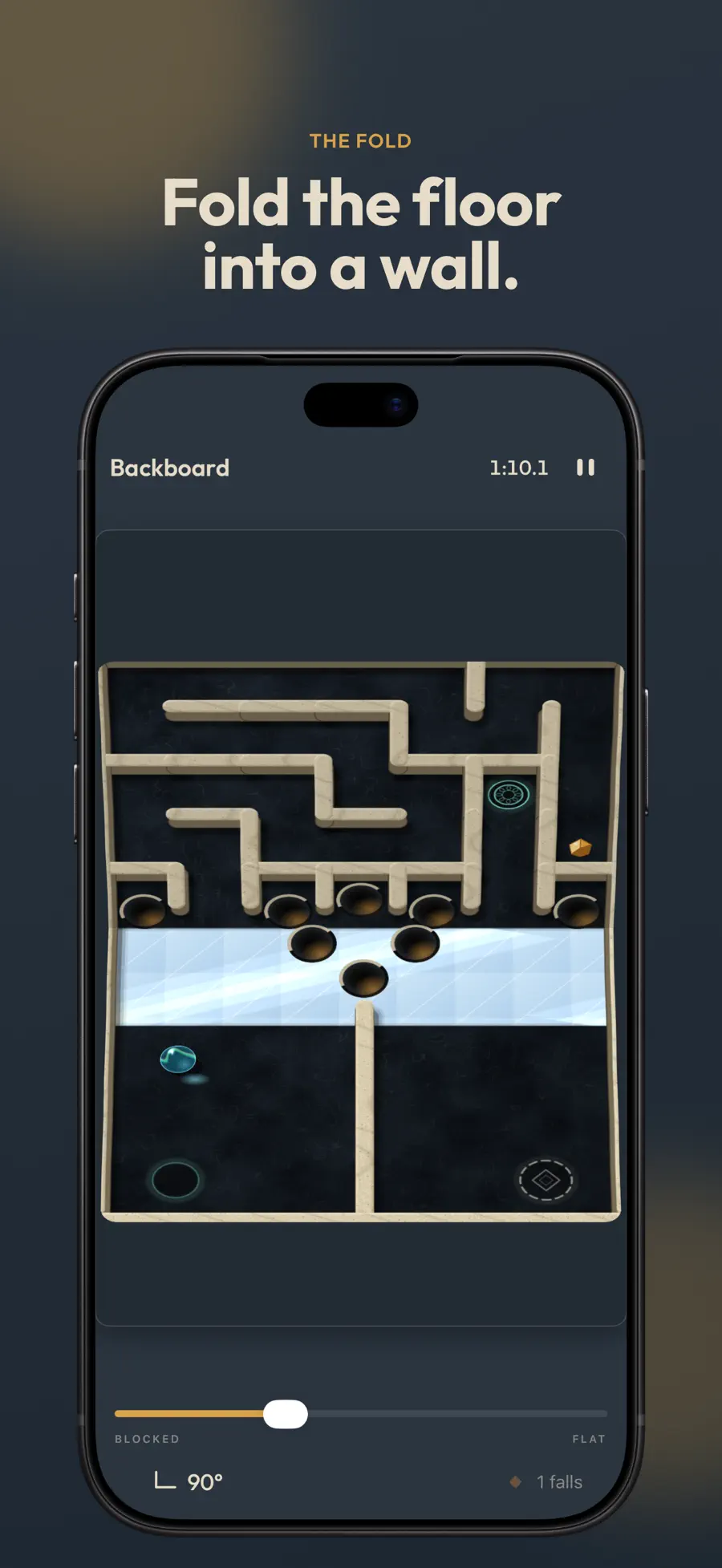
Read the route, then read the surface
The Trapdoor image shows holes, mechanisms and objects along the route. Backboard shows the two parts of the board forming different planes. The developer describes changing the incline, using a raised half as a rebound surface and shifting gravity across both halves by tilting the whole device.
An open route and a controllable route are therefore different things. Corners, holes and slopes still matter when you can see the destination. Compared with Hingami’s deliberate sequence of folds, this is more about judgement while something is moving. Consider whether you enjoy sustained motion input before choosing it.
Worlds change the rule, not just the scenery
The listing describes themes including basic terrain, two marbles, reflection and impulse. In Duo, two marbles share a tilt input; Mirror introduces a reflected relationship between the halves. These change how you interpret the board rather than simply repainting the same route.
Checked version 1.0.3 offers the first levels of each world free, with one-time unlocks and no subscription. The final Unhinged world is still advertised as coming soon. Check what is available today before buying. Other iPhones and iPads use an on-screen hinge.
Explore Marbles Unhinged · App Store
3. Two Fold: look for the answer in another world
The appeal: a character adventure built around changing worlds.
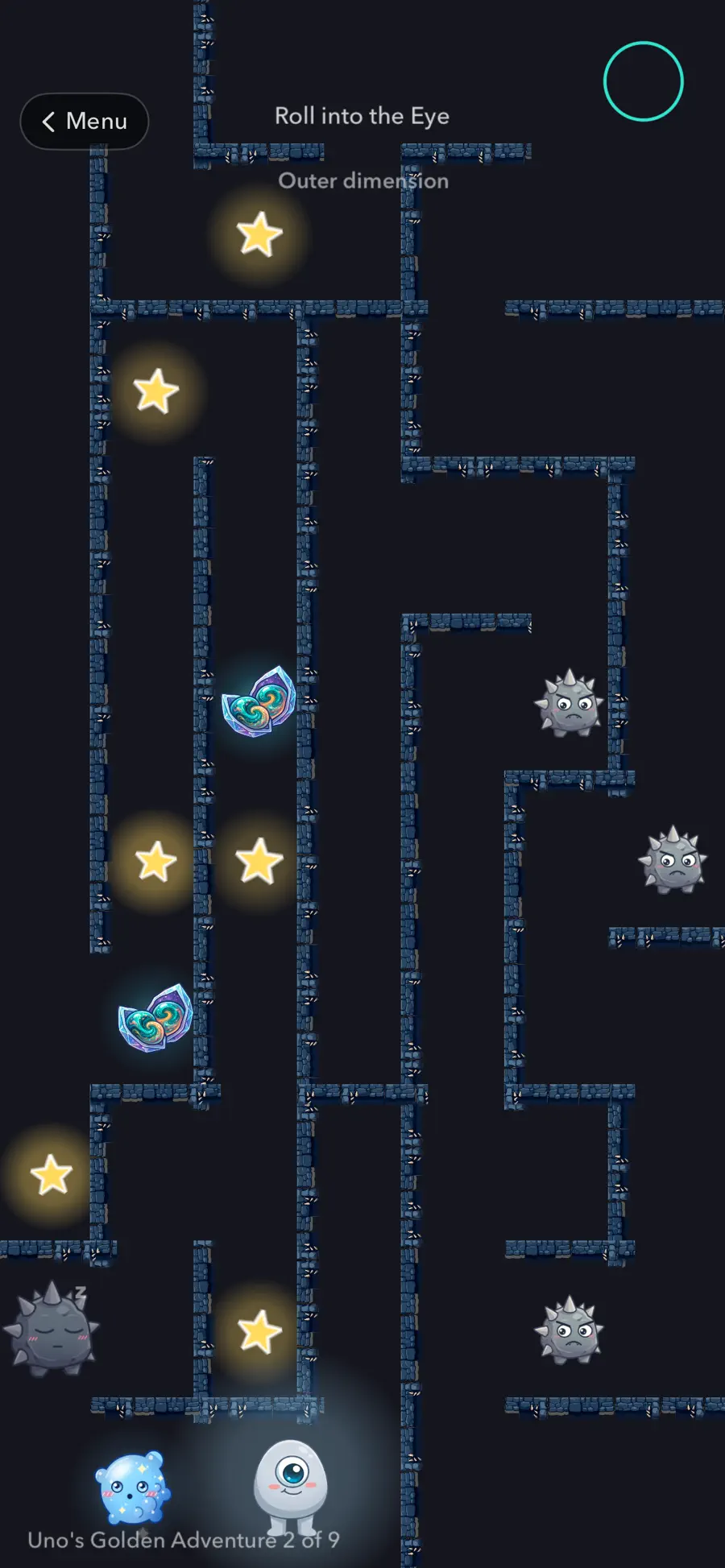
Uno is looking for his family. Two Fold gives that journey an Outer world when closed and an Inner world when unfolded. The developer describes using something found on one side to solve an obstacle on the other. Opening the phone is consequently part of understanding a level, rather than simply enlarging its camera view.
On a phone, swipe for the second image. Select an image for full resolution.

Being stuck may mean changing worlds
The adventure image shows platforms, stars, enemies and an exit. The description and tutorial notes also identify rolling, throwing stars, narrow passages and rewinding time. A decision can involve both the current map and whether another screen state offers a route or opportunity.
Choose this if you want to learn abilities alongside a character. Where Marbles emphasises a moving physical board, Two Fold asks what may exist in the other world. It also supplies characters and obstacles beyond Hingami’s paper transformations. Ordinary iPhones use rotation in place of opening and closing.
What is there beyond the main journey?
The menu exposes Levels, Endless, Events and Customize. The listing describes event courses and an endless mode, with Meadow remaining free and other environments adding challenges. Checked version 1.2 adds a tutorial, a pet area and companions associated with stopping time and opening portals. Progression therefore involves more than a change of scenery.
The description offers levels 1–17 free and a one-time story unlock, with no subscription or ads. Its level total does not agree with the newer release notes, so this article does not promise a definitive complete count. Use the current chapter list in the app to check the available content.
4. Halves: the other player should not see the answer
The appeal: shared-device games with genuinely different information.
Halves sits between two people. Eight base games, including Air Hockey, Reversi and Checkers, work on ordinary iPhones and iPads. Duo adds Draw & Guess, Word Spy and The Dial. Their important extra condition is that a raised half can show one player a secret word, key or target.
On a phone, swipe for the second image. Select an image for full resolution.
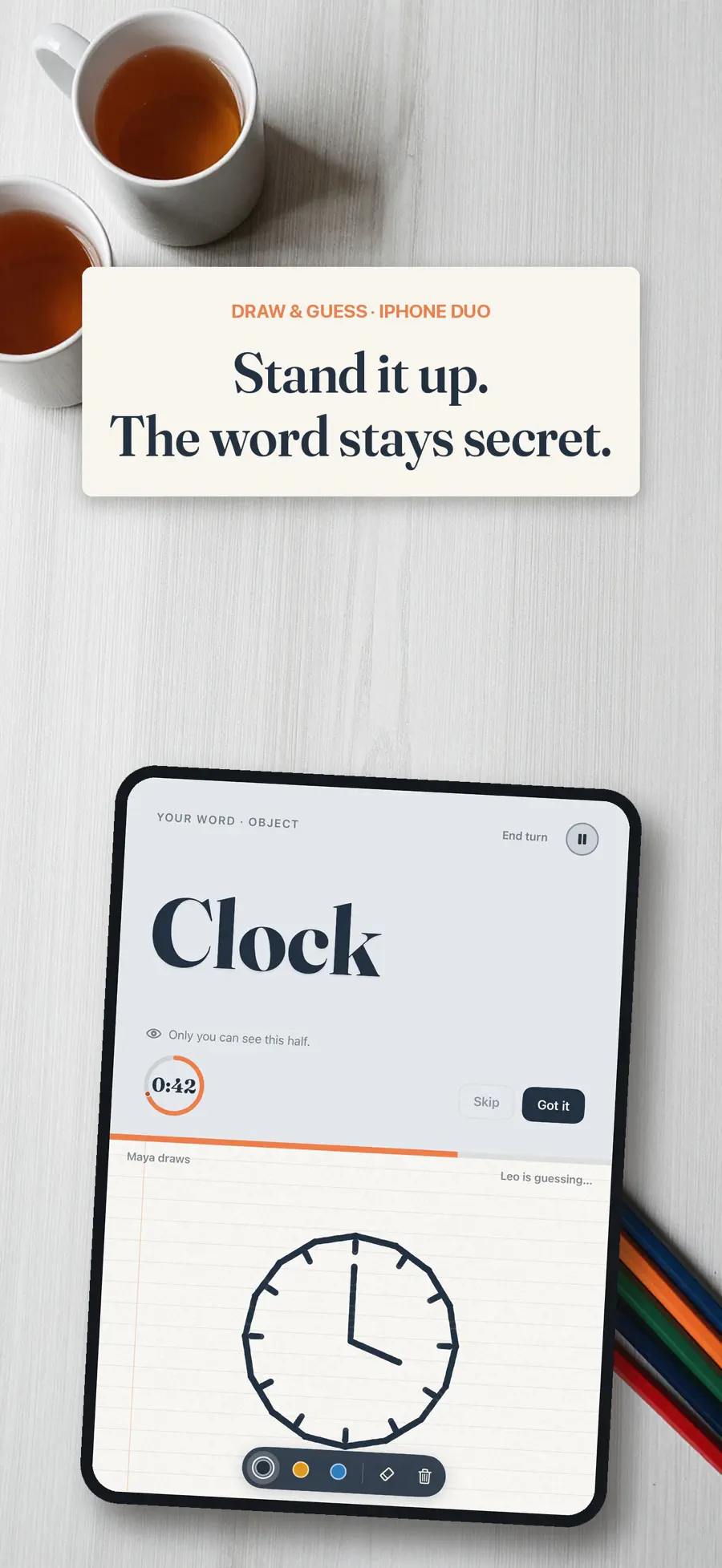
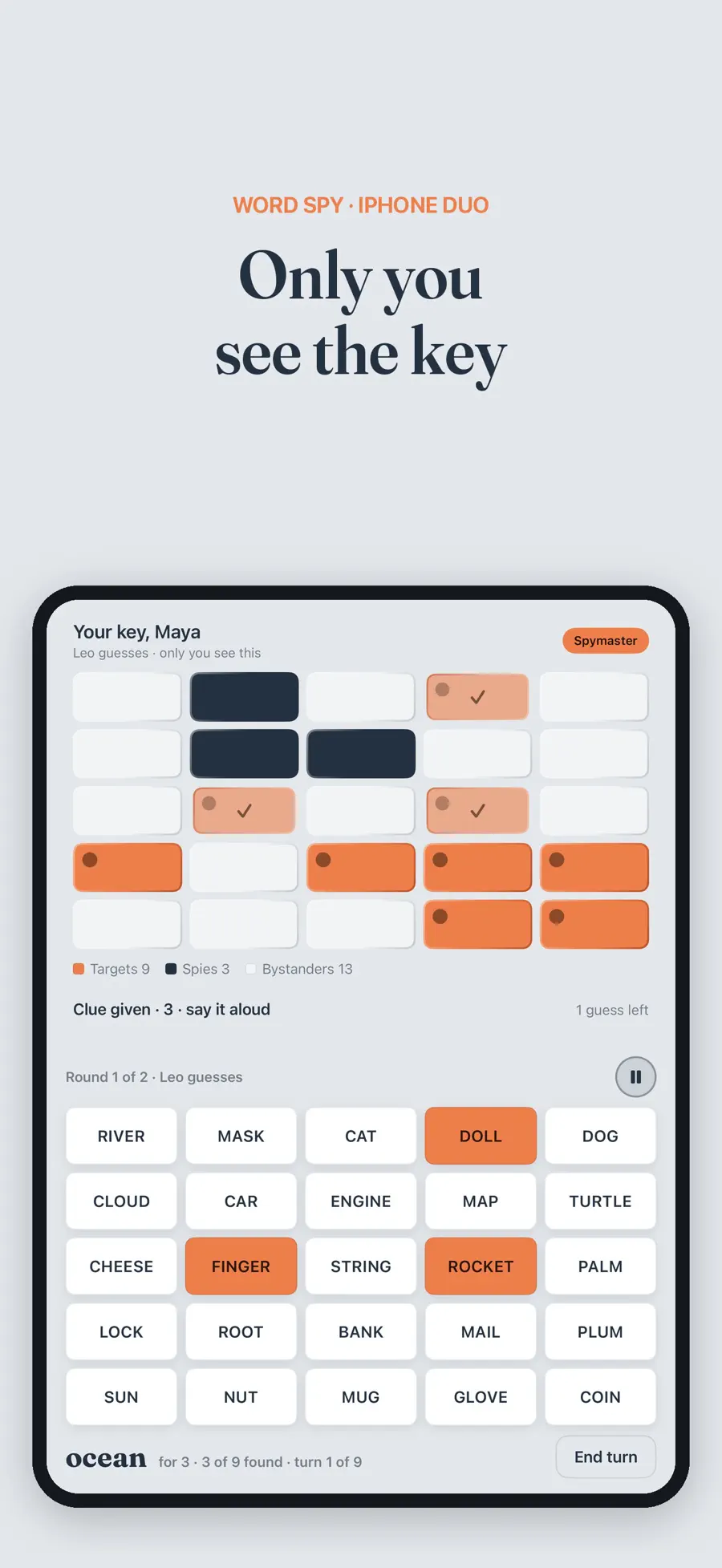
Two images show why privacy changes the game
Draw & Guess puts the word “Clock” above a shared drawing area, alongside the remaining time and each player’s role. One person knows what to draw; the other guesses from the picture. The raised surface has a specific purpose: keep the answer out of the other person’s view.
Word Spy separates a clue-giver’s private key from the shared word grid. The task is to help the other player identify targets while avoiding spies. That information asymmetry is different from laying a complete board flat for both people to inspect.
Where should a pair begin?
Air Hockey is a simple way to see whether sharing one device suits you. Move to Draw & Guess or Word Spy if you enjoy expression and deduction; The Dial also centres on a clue and a target. A second player is part of the appeal here. Someone primarily seeking a solo story should start elsewhere in this selection.
Checked version 1.0.1 lists offline play, no ads and no account requirement. Air Hockey stays free. The full set has a seven-day trial and a one-time unlock, without automatic renewal, with Family Sharing listed. The three extra Duo modes are not part of the eight-game shelf on conventional iPhones or iPads.
5. Toastie: decide when to open the lid
The appeal: a short cooking loop with a familiar physical action.
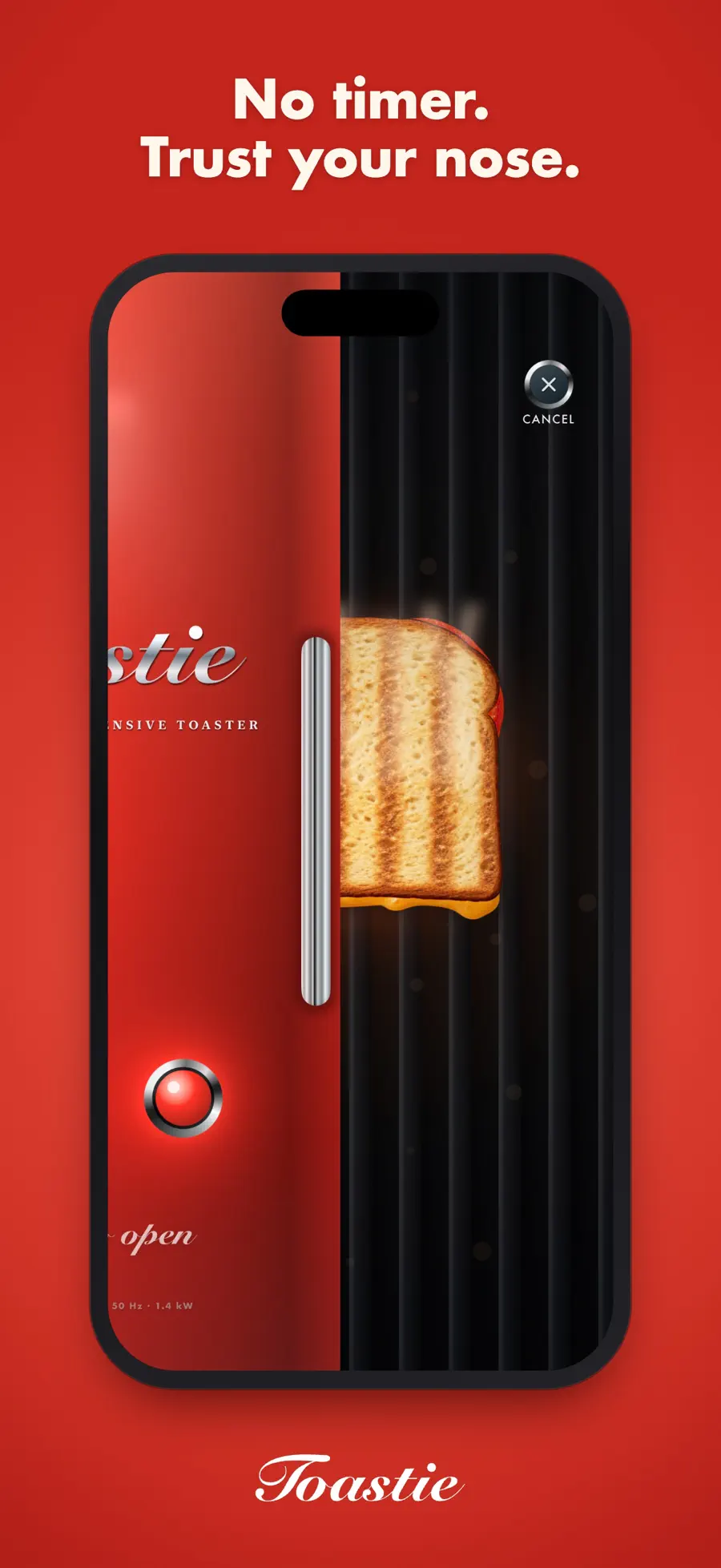
Toastie divides a grilled-cheese order into buttering bread, arranging fillings, closing the lid and deciding when to reopen it. It is easy to explain to someone nearby: the phone’s opening and closing becomes the toaster lid. The challenge also includes recipe, arrangement and timing, rather than simply displaying a meal.
On a phone, swipe for the second image. Select an image for full resolution.
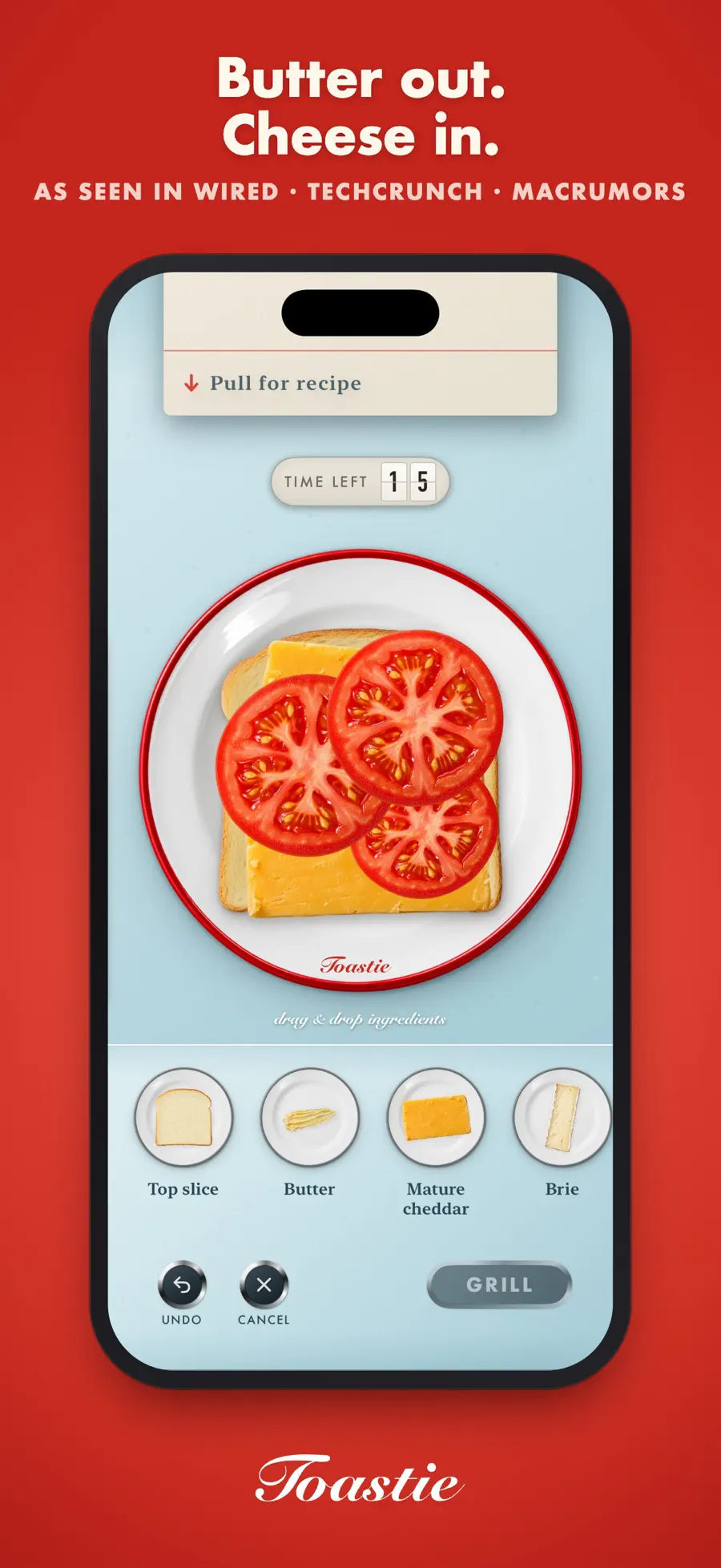
Preparation and grilling use different rhythms
The preparation image shows ingredient trays, a drag-and-drop area and a 15-second preparation limit. Assemble the order before moving to the grill. The second image focuses on the lid and the bread inside: the question has changed from what goes where to when it will be ready.
On Duo, the developer maps that lid to the device’s physical movement. Conventional iPhone and iPad play is also available, with different input. The relationship makes Toastie an approachable demonstration of the fold: the hardware action resembles the on-screen object without first teaching an abstract control scheme.
Why make another sandwich?
The description lists scoring for recipe, plating, toasting and preparation time. High scores can turn a result gold, while reaching a threshold unlocks another recipe. Different breads and fillings give the next order its own requirements. Checked version 1.2.1 adds Halloween sandwiches, so repetition has goals beyond closing the same lid again.
The US price at this check is US$2.99, with no in-app purchases or ads listed, and iCloud progress sync. Freestyle preparation and additional languages remain future plans in the release notes. If free-form experimentation matters more to you than following orders, confirm the current feature set before buying.
Which one should you download first?
- For quiet observation: Hingami leaves room to think about paper and spatial relationships without a countdown or lives.
- For motion and coordination: Marbles Unhinged combines tilt with a changing board.
- For a continuing adventure: Two Fold supplies world changes, characters and new abilities.
- For a friend across the table: Halves uses hidden information in its three extra Duo modes.
- For an immediately understandable fold interaction: Toastie turns opening and closing into a familiar kitchen action with a clear round objective.
Questions to settle before downloading
Which games can I try without paying first?
Hingami is currently a free download. Marbles Unhinged and Two Fold offer introductory levels before a one-time unlock. Halves keeps Air Hockey free and offers a trial for the wider set. Toastie is a paid download. Check your own storefront rather than treating “free” in a directory as a promise that every mode costs nothing.
Can I play without an iPhone Duo?
All five developers describe conventional-device play, but the scope differs. Hingami uses a drag gesture, Marbles an on-screen hinge and Two Fold rotation. Toastie supports ordinary touchscreen devices. Halves explicitly separates eight base games from three Duo-specific modes. Trying a conventional version can tell you whether you enjoy the rules; it cannot establish the feel of the physical hinge.
Does Duo support mean device-tested performance?
No. This selection verifies developer descriptions, release notes and original promotional images. Comfortable reach, angle response and progress after a posture change are still things to check in use. Our compatibility checklist explains evidence levels. Keep announced features separate from what the installed version actually provides.
Continue with the games directory, or make the rest of your device yours with wallpapers and the wallpaper setup guide.