
Duoboard: Foldable Keyboard
키 배치를 바꾸고 입력한 글, 이모지, 자주 쓰는 문구와 클립보드를 한곳에서 다루는 키보드입니다.
Patrick Gatewood · 생산성 · 무료
iPhone 스크린샷
iPhone Duo 활용 방식
펼친 Duo에서는 키와 편집 도구를 양쪽에 따로 놓거나 두 엄지에 맞춰 키를 좌우로 나눌 수 있습니다.
새로운 기능
버전 1.3 ·
Make Duoboard exactly your size. In Half or one-handed, slowly drag the space bar to make the keys exactly as wide as you like. Full, Half, Split and Dual each remember the size you set for them. Also in this update: • Slide for capitals and numbers: slide from shift onto a letter, or from 123 onto a number, and let go • Customizable Split View: choose which keys show on each half, in Settings • Smoother gestures: switching layouts now follows your fingers, so you can let go to keep it or slide back to cancel. Spread two fingers to split from any layout • Better swipe typing: swiping picks the word you meant more often • Smarter autocorrect: it fixes a word only when it's fairly sure, catches more missed letters, and learns fewer typos • A better demo to share: the try-before-installing demo is shorter and more fun • Suggestions stay in the top row, and the keys keep their full height • Plenty of small fixes under the hood
개발자가 이 내용을 한국어로 제공하지 않았습니다.
App Store 설명개발자가 작성한 내용입니다.
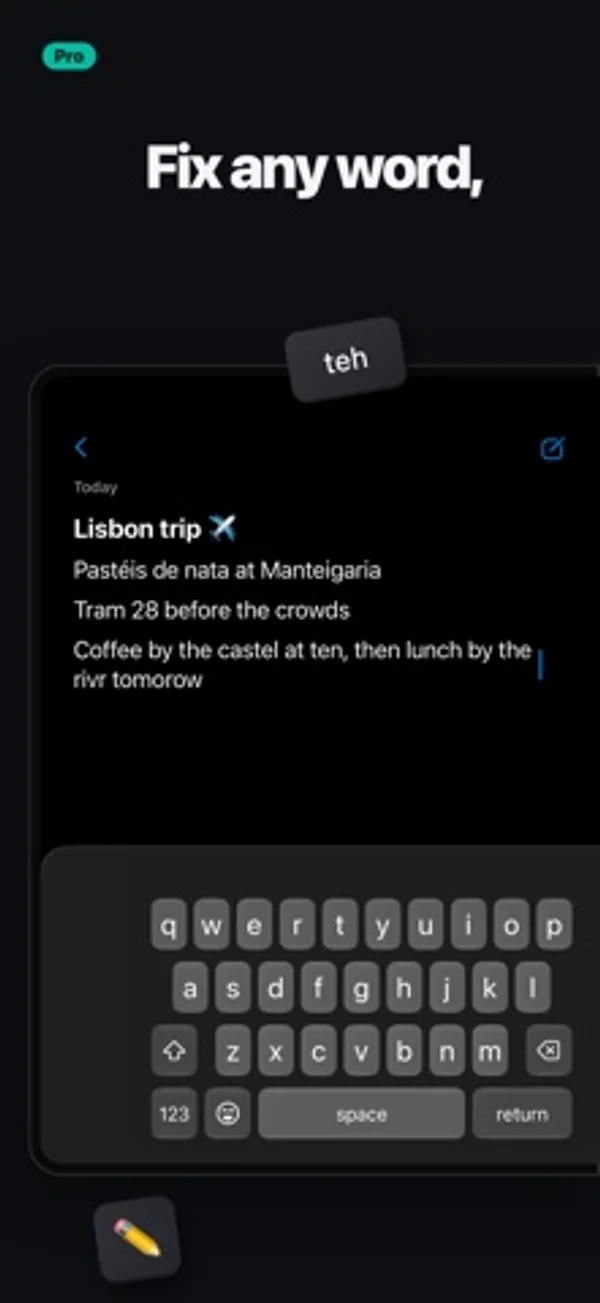
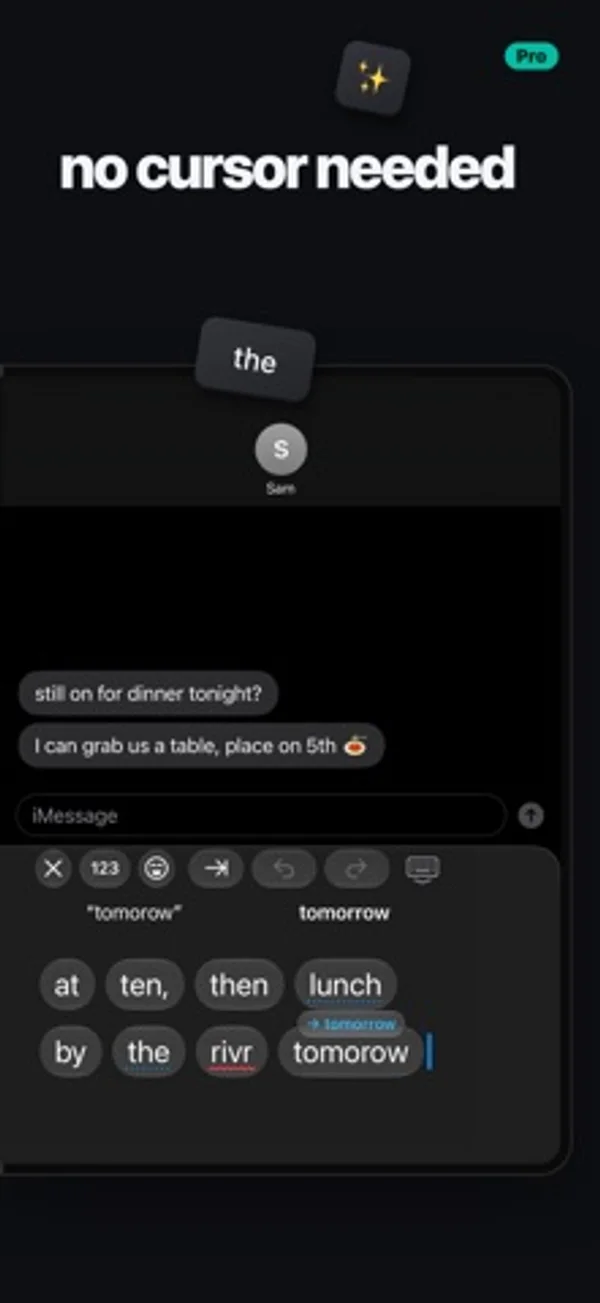
Duoboard puts your keyboard on one half of the open iPhone Duo and a productivity sidekick on the other. Or split the keys across both. LIVE EDIT No more cursor dance. Everything you've typed shows up right beside the keys, word by word, big enough to hit. Tap any word to swap it, fix it or retype it, without wrestling with the text in your app. Pinch two words to join them, or spread one to split it. In Half and in Split. HALF The keys on the screen you're holding, and your sidekick on the other: Live Edit, emoji with search, a number pad and symbols, your snippets and your clipboard. SPLIT One keyboard, a half under each thumb, like on iPad. Spread two fingers on the keys to split them, pinch to bring them back together, and drag the halves wider or narrower to fit your hands. Choose which keys show on which side. DUAL A whole keyboard under each thumb, split across the fold. FULL Or keep it classic, one keyboard across the whole screen. ONE-HANDED, WITHOUT THE FUSS • Sweep two fingers or flick the space bar toward a thumb, and the keyboard drops into Half under it. Sweep again to tuck the keys in for one hand. No holding the globe key, no menu. • On the closed Duo, flick the space bar toward your thumb for one-handed keys, and back for full width. • Drag the keyboard to any height and set its width, remembered for closed, open upright and open sideways. TYPES THE WAY YOU DO • Swipe typing, with suggestions as you swipe • Autocorrect that learns your words and your contacts' names, and reads the words before it • Next-word suggestions after a space • Missed spaces come apart: "itsjust" becomes "it's just" • Hold the space bar for a trackpad: the higher your thumb, the faster the cursor • Hold 123 for snake_case, kebab-case, camelCase or file paths • An optional number row, and a touch and hold on a letter for its accents • Emoji search that forgives typos • What you just copied waits in the suggestion bar, one tap to paste • Undo and redo in the suggestion bar • Set how fast the delete key repeats SNIPPETS AND CLIPBOARD Save the things you type all the time, your address, your email, a go-to reply, and send them with a tap. Duoboard can also keep what you copy, so it's there when you need it again. ON IPAD TOO Duoboard works on iPad too, Split and Live Edit included. PRIVATE Nothing you type leaves your device. No account, no ads, no tracking. DUOBOARD PRO The Full keyboard is free, with autocorrect, emoji, snippets and your clipboard. Duoboard Pro unlocks Half, Split, Dual, Live Edit and swipe typing: try it free for 7 days, then keep it with a one-time purchase. No subscription.
iPhone Duo에서의 Duoboard: Foldable Keyboard: 자주 묻는 질문
Duoboard: Foldable Keyboard은(는) iPhone Duo에 최적화되어 있나요?
네. Duoboard: Foldable Keyboard은(는) Duo 전용 설계 앱으로, 폴딩, Split View 또는 외부 디스플레이를 활용합니다. 2026년 11월 16일 확인(개발자 발표).
iPhone Duo에서 Duoboard: Foldable Keyboard은(는) 어떻게 보이나요?
펼친 Duo에서는 키와 편집 도구를 양쪽에 따로 놓거나 두 엄지에 맞춰 키를 좌우로 나눌 수 있습니다.
Duoboard: Foldable Keyboard의 가격은 얼마인가요?
Duoboard: Foldable Keyboard은(는) App Store에서 무료로 다운로드할 수 있습니다.
다른 생산성 앱
모두 보기 ›
걸리는 시간별로 할 일을 분류하는 차분한 할 일 목록 겸 종이 스타일 플래너

월이 바뀌어도 주간을 이어 보고 iPhone 캘린더 일정을 확인하거나 수정합니다.

USB나 Wi-Fi로 iPhone을 Mac의 확장 모니터로 쓰고 터치로 창을 조작합니다.

월간 달력과 일정 목록, 분할 보기로 일정과 일기를 관리합니다.

타자기 키보드와 녹음된 키 소리, 캐리지 동작으로 글을 씁니다.

대화를 녹음하고 전사해 요약과 실행 항목, 후속 문안을 만듭니다.