
Tabletop Minutes: AI Notes
회의를 녹음하고 전사문을 검토해 결정 사항과 담당자·기한이 있는 실행 항목으로 정리합니다.
TAKAHIKO SOMA · 생산성 · 무료
iPhone 스크린샷
iPhone Duo 활용 방식
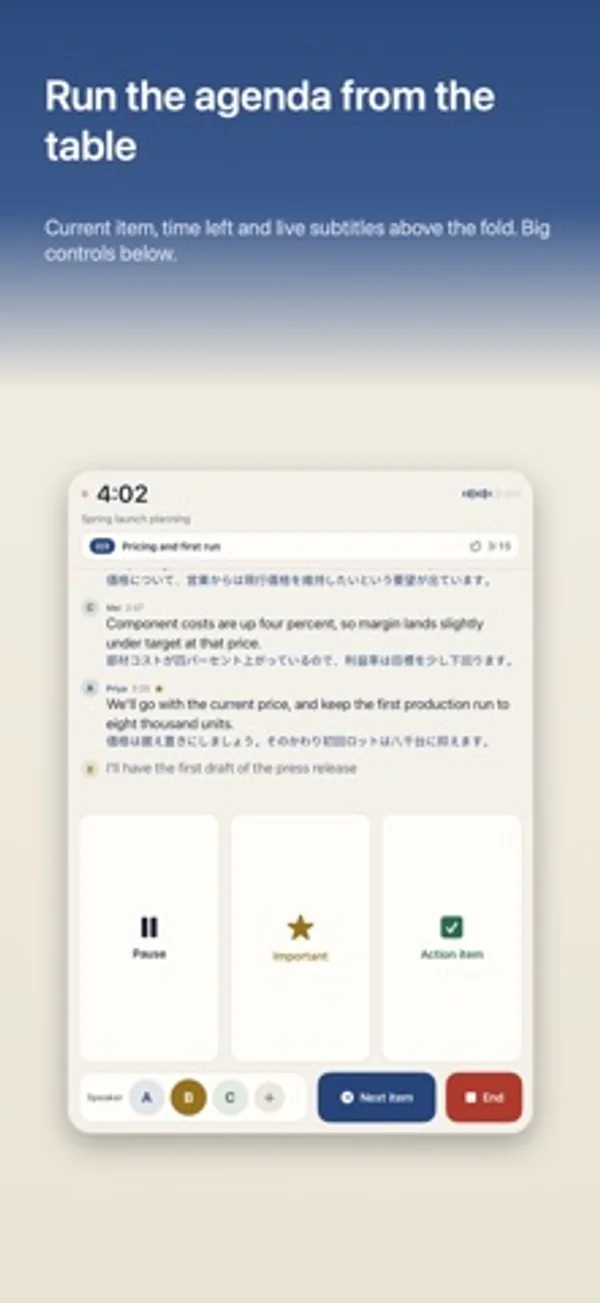
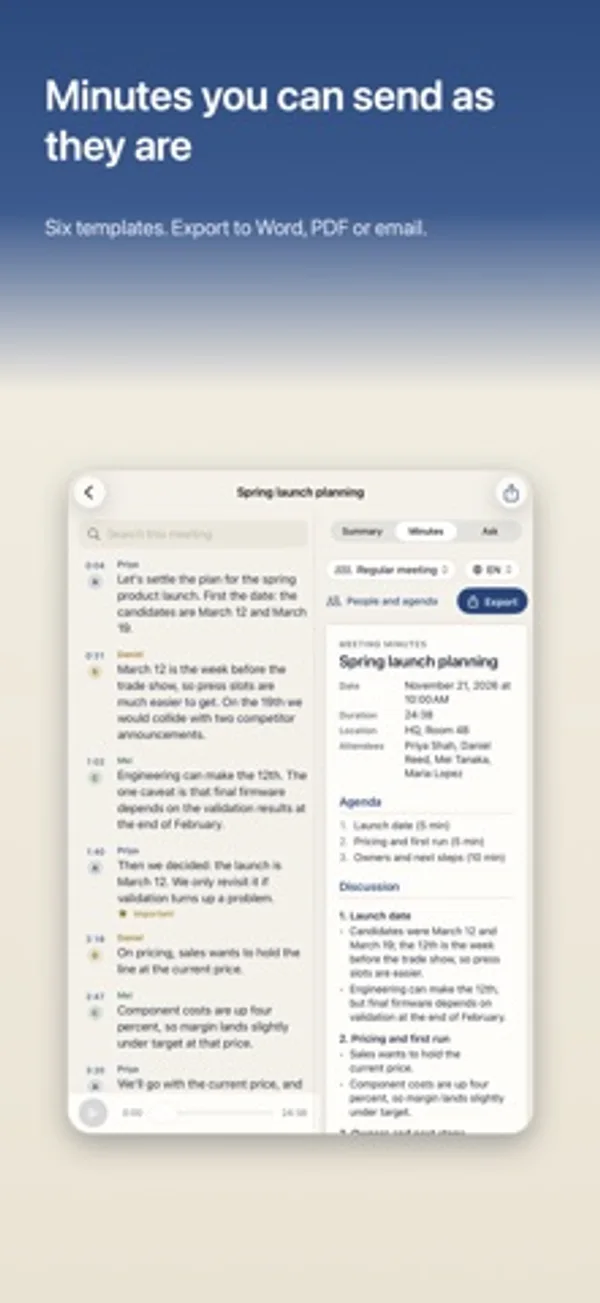
개발자 설명에 따르면 반쯤 열면 위쪽에 실시간 전사문, 아래쪽에 큰 조작 버튼이 나오며 펼치면 원문과 회의록·질문을 나란히 보여 줍니다.
App Store 설명개발자가 작성한 내용입니다.
Stop writing up meetings. Put your iPhone on the table, talk, and leave with minutes you can send. Tabletop Minutes records the meeting, transcribes it on your iPhone, and turns the transcript into real minutes: what was discussed, what was decided, who does what by when. Not a wall of quotes. The discussion is restated, repetition is merged, and numbers and dates are kept exact. MINUTES THAT READ LIKE SOMEONE WROTE THEM • An overview of the meeting in a few sentences • Decisions, separated from discussion • Action items with owner and due date, linked to the moment they came up • Open questions and next steps • Notes under each agenda item when you set an agenda • Six formats: regular meeting, sales call, 1-on-1, interview, staff meeting, class or lecture • Write the minutes in English, Japanese, Spanish, French, German, Chinese or Korean, whatever language the meeting was in • Export to Word (.docx), PDF (A4 or Letter), Markdown or plain text, or copy it ready for email RUN THE MEETING, NOT THE APP • Agenda mode: time each item, see the current item and time left, tap "Next item" to move on • One tap to mark a remark as important or as an action item while people talk • Live translation subtitles under the transcript, translated on device • Speakers are told apart automatically by voice, on device; name them once, see talk time • Custom vocabulary for names, products and jargon • Keeps recording when the screen locks; pauses for calls and resumes AFTER THE MEETING • Every action item from every meeting in one tracker, with due dates and an overdue badge • Send action items to Reminders • Follow-up email drafted from the minutes • Ask a meeting, or all of them: "What did we decide about pricing?" Answers cite the meeting and the exact moment • Import recordings from Files, Voice Memos or another app and get minutes for those too • Search every transcript; folders, tags, Face ID lock BUILT FOR THE FOLD On a folding iPhone the app follows the hinge: • Half open on the table: live transcript and the current agenda item above the fold, large controls below • Fully open: transcript on one side; summary, minutes and questions on the other • Closed: one big record button and a timer on the outer display On an iPhone that does not fold, everything works in a single-column layout. YOUR AUDIO STAYS ON YOUR IPHONE • Recording and transcription happen on device, using Apple's speech recognition. Audio is never uploaded. • The free plan is fully on device: transcripts and summaries from the on-device Apple Intelligence model, nothing sent anywhere. • High-accuracy minutes (Pro) send the transcript text, never the audio, to our server, where a large AI model writes the minutes. The text is not saved on our server. The app asks before the first time, and you can turn this off in Settings and stay fully on device. • No account, no ads, no analytics. FREE AND PRO Free: 3 meetings a month, up to 30 minutes each. On-device transcripts and summaries, speaker names, talk time, the action tracker, Siri shortcuts, and Markdown, text and audio export. Tabletop Minutes Pro (subscription): high-accuracy AI minutes, unlimited meetings, and every feature above. • Monthly or yearly, with a 1-week free trial for new subscribers. • Payment is charged to your Apple Account. The subscription renews automatically unless you cancel at least 24 hours before the end of the current period. Manage or cancel it in your Apple Account settings. • High-accuracy minutes include a generous monthly allowance (40 hours of meetings). Terms of Use (EULA): https://www.apple.com/legal/internet-services/itunes/dev/stdeula/ Privacy Policy: https://takawmd2524-boop.github.io/tabletop-minutes-legal/privacy.html Languages depend on what iOS supports on your device. On-device summaries need Apple Intelligence. High-accuracy minutes need an internet connection. Tell people in the room that you are recording.
iPhone Duo에서의 Tabletop Minutes: AI Notes: 자주 묻는 질문
Tabletop Minutes: AI Notes은(는) iPhone Duo에 최적화되어 있나요?
개발자 또는 스토어가 iPhone Duo 지원을 안내합니다.
iPhone Duo에서 Tabletop Minutes: AI Notes은(는) 어떻게 보이나요?
개발자 설명에 따르면 반쯤 열면 위쪽에 실시간 전사문, 아래쪽에 큰 조작 버튼이 나오며 펼치면 원문과 회의록·질문을 나란히 보여 줍니다.
Tabletop Minutes: AI Notes의 가격은 얼마인가요?
Tabletop Minutes: AI Notes은(는) App Store에서 무료로 다운로드할 수 있습니다.
다른 생산성 앱
모두 보기 ›
걸리는 시간별로 할 일을 분류하는 차분한 할 일 목록 겸 종이 스타일 플래너

키 배치를 바꾸고 입력한 글, 이모지, 자주 쓰는 문구와 클립보드를 한곳에서 다루는 키보드입니다.

월이 바뀌어도 주간을 이어 보고 iPhone 캘린더 일정을 확인하거나 수정합니다.

USB나 Wi-Fi로 iPhone을 Mac의 확장 모니터로 쓰고 터치로 창을 조작합니다.

월간 달력과 일정 목록, 분할 보기로 일정과 일기를 관리합니다.

타자기 키보드와 녹음된 키 소리, 캐리지 동작으로 글을 씁니다.