
DuoWall
Create coordinated inner and outer wallpapers and export your images in customizable device mockups.
Faisal Alrajhi · Creative · Free
iPhone screenshots
How it uses iPhone Duo
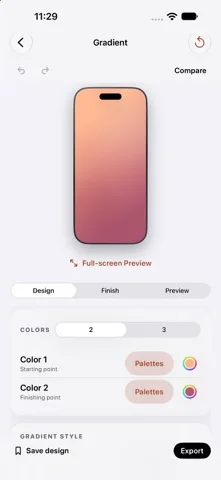
Create matching wallpapers for the inner and outer displays with Duo Pair, preview device poses, and use a dedicated Duo editing toolbar.
What’s New
Version 1.2 ·
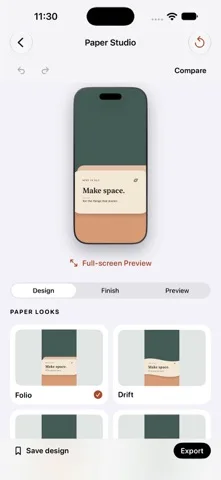
A little more room to create. • Introducing Papercraft: Paper Landscapes, Cut-out Arches, Folded Forms, and Torn Paper. Make each look yours with custom colors, depth, scale, and placement. • A new editing toolbar on iPhone Duo brings common actions within easy reach. • Larger previews on wide screens, plus Hide Controls to give your design more space. • Pick up where you left off with automatic local wallpaper drafts and Recent Mockups, including your imported images and layout. • Improved English and Arabic layouts, with your existing language choice and saved designs preserved. Drafts stay on your device. Export your finished work to keep a separate copy.
App Store descriptionWritten by the developer.
Make something that feels like you. DuoWall brings wallpaper creation and device mockups together in one simple studio. Start with a look, make it yours, and see your changes as you edit. CREATE YOUR WALLPAPER Explore gradients, solid colors, Retro, Heritage, Dot Matrix, Papercraft, Paper Studio, Glass & Glow, material-inspired designs, shapes, patterns, typography, and more. Customize colors with curated palettes or the native color picker. Add texture, try light and dark companions, and compare your edits. DESIGN FOR YOUR SCREEN Choose an iPhone size or create coordinated inner and outer wallpapers with Duo Pair. Preview the composition in different device poses and open a distraction-free full-screen view. BUILD A MOCKUP Place your own image in an iPhone, iPad, or Duo frame. Choose a clean or detailed frame, arrange multiple devices, and adjust backgrounds, scenes, shadows, and reflections. Export mockups as PNG, with a transparent background when you need one. KEEP YOUR IDEAS Save editable wallpaper designs in your local library, organize them into collections, and revisit them later. Continue your latest wallpaper draft or reopen Recent Mockups with device-local autosave. Export wallpapers to Photos and mockups to Photos or Files. MADE TO STAY SIMPLE No account, ads, or subscription. Wallpaper rendering and image editing happen on your device. DuoWall creates still-image wallpapers; it does not automatically change your system wallpaper. Device mockups are artistic representations. DuoWall is an independent app and is not affiliated with or endorsed by Apple. Questions or feedback? Contact hi@duowall.app.
DuoWall on iPhone Duo: FAQ
Is DuoWall optimized for iPhone Duo?
Yes. DuoWall is Built for Duo: it uses the fold, Split View or the outer display. Verified on October 26, 2026 (App Store text).
What does DuoWall look like on iPhone Duo?
Create matching wallpapers for the inner and outer displays with Duo Pair, preview device poses, and use a dedicated Duo editing toolbar.
How much does DuoWall cost?
DuoWall is free to download on the App Store.
More Creative apps
See all ›
Turns iPhone or iPad into a film slate that claps, syncs, and logs takes.

Draw on one half of the Duo, fold it shut, then reopen to reveal a mirrored picture.

Make folded inkblot prints with droppers, folding and rubbing, then save or share each print.

Turns your iPhone into an instant camera that prints framed photos you can caption and keep.

Drawing and painting app with custom brushes and unlimited layers

Record with the front and back cameras at the same time