
FabricLoop: Chat+Tasks+Docs+AI
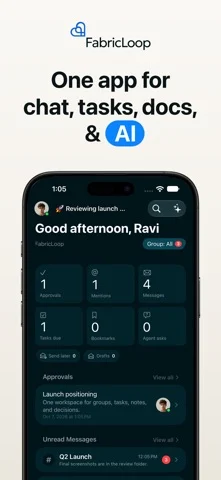
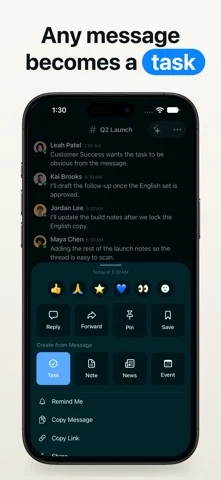
Combine team chat, tasks, notes, calls, and AI agents in one workspace, turning messages into tasks.
FabricLoop Inc · Productivity · Free
iPhone screenshots
What’s New
Version 5.0 ·
FabricLoop 5.0 A HOME FOR YOUR AGENTS Agents, Apps, News, and Events each get their own tab. Open any agent to see its status, run history, and settings. The list shows every agent's last run, budget, and state at a glance. CREATE AN AGENT BY DESCRIBING IT Say what you want it to do, choose its channel and integrations, and it starts paused so you decide when it goes live. Run it once, or retry a run, right from the list. STAY IN CONTROL Edit what each agent knows, review its triggers, check this month's spend, and see who it asks next. UNDO DELETED MESSAGES Deleted a message by mistake? Tap Undo within a few seconds. EASIER GROUPS AND ATTACHMENTS Editors can manage group settings from the new Groups tab in More. Photos and files added to a task keep uploading even if you leave the screen.
App Store descriptionWritten by the developer.
FabricLoop is the team workspace for chat, tasks, notes, calls, and AI agents. Turn any message into a task in one tap, and Ask AI searches your workspace to draft what’s next. It replaces a stitched-together stack of chat, tasks, docs, and calls with one connected place to work. • Team Chat & Messenger • Task Manager & Kanban Boards • Notes & Docs • AI Agents & Ask AI • Voice AI • MCP Apps (Cursor, Claude, ChatGPT) • Video & Audio Calls • Groups, News & Events • Replace Slack, Asana, Notion, and Zoom with one native app • Turn any message into a task, note, news post, or event in one tap • Ask AI searches your whole workspace and drafts the next steps • Build custom AI agents that watch channels and close the loop • Connect Cursor, Claude, and ChatGPT via MCP with audited, revocable access • Meet, chat, and plan work without losing context TEAM CHAT AND MESSENGER • Channels, group DMs, and 1:1 messages • @mentions, threads, reactions, bookmarks, and Remind Me • @channel, @here, and @everyone for group-wide alerts • Images, files, voice clips, and video in chat • Message an AI agent or app in the same inbox — no slash commands • Per-channel notification preferences TASK MANAGER, KANBAN BOARD, AND CALENDAR • List, kanban board, and calendar views • Assign tasks to people, agents, or apps • Priority, start/due dates, and percent complete • Dashboard for workload, pipeline, and at-risk work • Comments and attachments on every task • Convert a chat message into a tracked task in one tap • Break a task into subtasks, up to three levels • Block a task until another one is done • Estimate in sizes, points, or hours • Color-code cards with labels, and give each task a code like FL-142 NOTES AND DOCS • Real-time co-editing — everyone sees the same doc as you type • Headings, checkboxes, tables, comments, and attachments • Highlight any sentence and turn it into a task • Route approvals to a person, AI agent, or app • Scan documents on iPhone AI ASSISTANT, AGENTS, AND VOICE AI • Ask AI searches messages, tasks, notes, and file text • Drafts follow-ups and creates the next tasks • Voice AI on iPhone — speak instead of typing, hands-free • Build custom AI agents that watch groups and run on a schedule • Mention an agent, assign it work, or let it ask you a question APPS AND MCP • Connect Direct and MCP apps: Cursor, Claude, ChatGPT, GitHub, Google • Apps read and write notes, tasks, and news with audited, revocable grants • Mention an app in chat or use it from Ask AI • Channel apps and incoming webhooks VIDEO AND AUDIO CALLS • Start a call without leaving the workspace • On iPhone, calls ring like a phone call • Screen share, live transcription, and searchable call notes • Follow-up tasks stay attached to the meeting GROUPS, NEWS, EVENTS, AND PEOPLE • Groups organize teams, projects, and topics — items can belong to more than one • Browse, join, and leave groups • Announcements and events with RSVPs • See teammates by timezone and real presence SEARCH, WIDGETS, AND HOME • Advanced workspace search with filters and file text • Home Screen widgets and quick actions • Messages overview for threads, mentions, and reactions GET STARTED IN MINUTES Invite your team, create your first channel, and turn conversations into tracked work — no training required.
FabricLoop: Chat+Tasks+Docs+AI on iPhone Duo: FAQ
Is FabricLoop: Chat+Tasks+Docs+AI optimized for iPhone Duo?
The developer or App Store listing mentions iPhone Duo support.
How much does FabricLoop: Chat+Tasks+Docs+AI cost?
FabricLoop: Chat+Tasks+Docs+AI is free to download on the App Store.
More Productivity apps
See all ›
Calm to-do list and paper-style planner that sorts tasks by how long they take

Task and project management with layouts for both iPhone Duo displays

Unified inbox from Readdle with message and inbox side by side when unfolded

Task manager from Cultured Code, reshaped for every iPhone Duo pose

A private handwriting-style notebook that opens when you unfold iPhone Duo

Visual timeline day planner with a Focus Timer for book and tabletop poses