
InfiniteUp: Planner & Focus
Duo support is reported in the linked sources. The specific fold interaction and real-device behavior have not been independently verified.
InfiniteUp LTD. · Productivity · Free
iPhone screenshots
How it uses iPhone Duo
Duo support is reported in the linked sources. The specific fold interaction and real-device behavior have not been independently verified.
What’s New
Version 1.0.60 ·
-Extra polish -Allowing subscriptions
About this app
Most to-do apps are a place to store your intentions. InfiniteUp takes the thing you have been avoiding, breaks it into steps you can actually start, and stays with you until it is done.
App Store descriptionWritten by the developer.
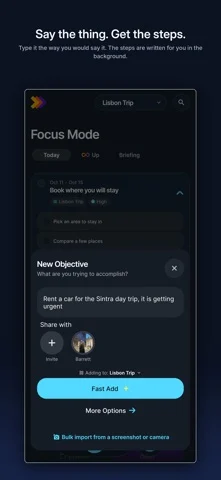
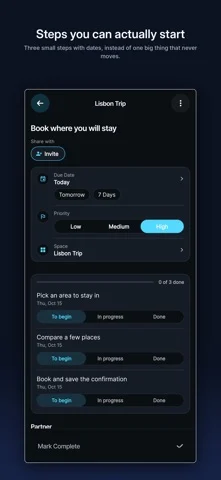
Most to-do apps are a place to store your intentions. InfiniteUp takes the thing you have been avoiding, breaks it into steps you can actually start, and stays with you until it is done. Say the thing. Type it, speak it, or photograph the list already on your desk. In seconds it comes back as ordered steps with dates that make sense, and a partner that asks the one question that changes the plan, then edits the plan in front of you when you answer. Do the next thing. Focus Mode shows what is due today and nothing else. Tick a small step, or push something to tomorrow with one tap. Up, the path of small wins, keeps the streak honest. The Briefing writes your day as a morning newspaper, from your own plan, in under a second. See the whole plan. On a computer, or on the open iPhone Duo, the same account becomes a board and a week you can drag things around on. Closed, the Duo is the phone you already know. Open, the board puts To-Do and In Progress on the left page and Complete and Future on the right, the Briefing prints as a two-page spread, and the week turns with a swipe across the fold. Nothing important sits on the fold. Share it. Invite anyone to a thing by email or a link. They see the same steps and the same conversation, and nothing lands on their board until they accept it. It works the way you do. When you start, you say what you are working towards and how you like a plan written: tiny fifteen-minute steps or bigger blocks, time estimates on or off, the most important step first. Every plan after that fits you a little better. Your data, your call. Your goals and messages are sent to Google Vertex AI so plans can be written, and Google does not train on them. Voice notes are read once and deleted in the same request. Notifications you can count on one hand, and a delete button that removes your account and everything on it. In 30 languages, including right-to-left ones, where the whole app flips rather than just the labels. Same account on iPhone, iPad, Mac, Android and the web. Made by a four-person studio in Nanaimo, British Columbia, and shaped every week with the people using it.
InfiniteUp: Planner & Focus on iPhone Duo: FAQ
Is InfiniteUp: Planner & Focus optimized for iPhone Duo?
The developer or App Store listing mentions iPhone Duo support.
What does InfiniteUp: Planner & Focus look like on iPhone Duo?
Duo support is reported in the linked sources. The specific fold interaction and real-device behavior have not been independently verified.
How much does InfiniteUp: Planner & Focus cost?
InfiniteUp: Planner & Focus is free to download on the App Store.
More Productivity apps
See all ›
Calm to-do list and paper-style planner that sorts tasks by how long they take

Task and project management with layouts for both iPhone Duo displays

Unified inbox from Readdle with message and inbox side by side when unfolded

Task manager from Cultured Code, reshaped for every iPhone Duo pose

A private handwriting-style notebook that opens when you unfold iPhone Duo

Visual timeline day planner with a Focus Timer for book and tabletop poses