
Penbook: Paper Planner & Notes
Duo support is reported in the linked sources. The specific fold interaction and real-device behavior have not been independently verified.
Pencil Research · Productivity · Free
iPhone screenshots
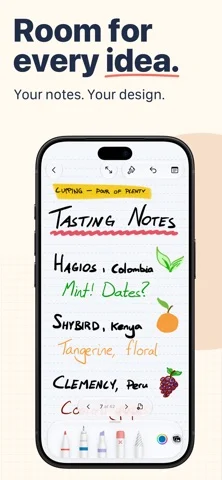
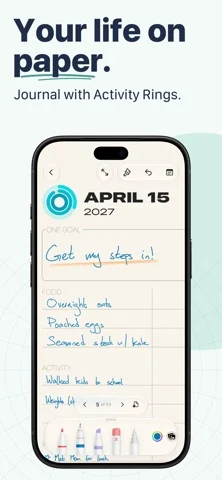
How it uses iPhone Duo
Duo support is reported in the linked sources. The specific fold interaction and real-device behavior have not been independently verified.
What’s New
Version 8.1.1 ·
iPhone Duo users, this one's for you: this update adds support for poses, new stationery sizes, and a minimap update. (This minor update fixes an incorrect stationery size.)
About this app
Write naturally with your Apple Pencil on Live Paper with Penbook.
App Store descriptionWritten by the developer.
Write naturally with your Apple Pencil on Live Paper with Penbook. Build your perfect notebook from more than four hundred types of stationery. Then, use the best digital inking technology to pour your ideas, notes, plans, and dreams into it. Penbook's Live Paper is way smarter than ordinary stationery. Schedule your life on a monthly planner that shows a real calendar, organize your day with a day planner that shows you what time it is, and record your nutrition on a food diary that knows what day it is. Or, bring your own stationery! Import your PDFs into Penbook for quick annotation and editing. Give your notebooks colorful covers with fun art, and share them so your notes are always where you need them. FEATURES • Live Paper, the dynamic stationery that uses the smarts of your iPad and iPhone • Over 400 of academic, scientific, and planning stationeries • Import PDFs and use them as notebooks • Write naturally with your Apple Pencil, stylus, or finger • Unlimited unique cover combinations for your notes • Search your handwritten notes for words or phrases • Snap your strokes to perfect shapes with shape recognition INCLUDED STATIONERIES Penbook has a huge selection of customizable stationery. Each page of your notebook can be different, turning your iPad or iPhone into a magic notebook: • Blank stationery, with an optional date and configurable margin • Ruled paper with variable density • Graph paper with four options for square sizes • Dot stationery, either squared or isometric (offset) • Cross stationery with configurable margins and density • To Do pages with four layout options • Monthly habit paper for tracking streaks, habits, and goals • Day planner paper with a live updating timeline and calendar, and three layouts • Weekly planner paper that highlights the current time and date • Monthly planner paper that keeps track of the current day and shows you what's coming next • Yearly stationery for getting a complete overview of your next 365 days • Cornell paper for taking perfect study notes • French ruled (Séyès) paper • Penmanship practice paper • Table stationery for hand-written spreadsheets • Polar graph paper for plotting radial data • Semi-log and loglog paper for data with exponential growth or decay • Isometric stationery with equilateral (60-60-60) or isosceles (75-75-30) triangles • Perspective paper, configurable with one, two, or three vanishing points • Developer stationery with device stencils and configurable note-taking areas • Storyboard paper with 3 frame aspect ratios • Engineering paper with variable density • Chemistry paper for easily sketching molecules • Staff and tablature (music) paper with optional linked staves GET THE MOST OUT OF PENBOOK Use all of Penbook's stationery and writing features in a single notebook for free for as long as you like. Upgrade to Penbook Premium to create and export unlimited notebooks, receive access to new stationery and covers as they're designed, and get regular app updates. Penbook Premium is available by purchasing a yearly subscription or a one-time (lifetime) in-app purchase. When you choose to upgrade with the yearly subscription, you can start using Penbook Premium for free with a 7-day free trial. During the trial, cancel any time until 24 hours before the trial expires, and you will not be charged. If you do not cancel, you will be automatically billed for the yearly subscription when your free trial ends. Payment will be charged to your Apple ID account at the confirmation of purchase. Subscription automatically renews unless it is canceled at least 24 hours before the end of the current period. Your account will be charged for renewal within 24 hours prior to the end of the current period. You can manage and cancel your subscriptions by going to your account settings on the App Store after purchase. Our customer-first privacy policy: https://penbook.app/privacy-policy Penbook's terms of use: https://penbook.app/terms-of-use
Penbook: Paper Planner & Notes on iPhone Duo: FAQ
Is Penbook: Paper Planner & Notes optimized for iPhone Duo?
The developer or App Store listing mentions iPhone Duo support.
What does Penbook: Paper Planner & Notes look like on iPhone Duo?
Duo support is reported in the linked sources. The specific fold interaction and real-device behavior have not been independently verified.
How much does Penbook: Paper Planner & Notes cost?
Penbook: Paper Planner & Notes is free to download on the App Store.
More Productivity apps
See all ›
Calm to-do list and paper-style planner that sorts tasks by how long they take

Task and project management with layouts for both iPhone Duo displays

Unified inbox from Readdle with message and inbox side by side when unfolded

Task manager from Cultured Code, reshaped for every iPhone Duo pose

A private handwriting-style notebook that opens when you unfold iPhone Duo

Visual timeline day planner with a Focus Timer for book and tabletop poses