
SuperPlanner: Daily Planner
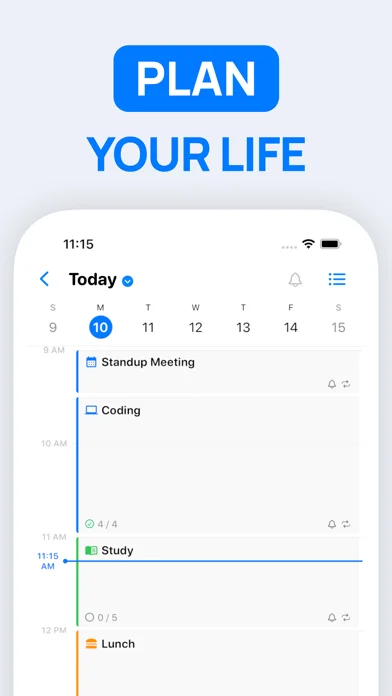
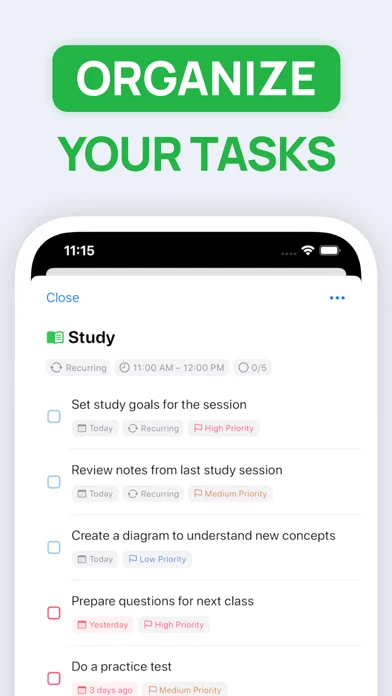
Combines calendar events, tasks and time blocking into one daily planner.
Gabriel Guarino · Productivity · Free
iPhone screenshots
What’s New
Version 3.1.2603 ·
iPhone Duo • SuperPlanner adapts to both displays: your day in hand on the outer display, the sidebar beside a full-height timeline when you open the phone • Day Summary sits beside the timeline when the phone is open in landscape • Fold the phone halfway and the current activity's tasks appear on the other half • Sectioned lists spread into two columns on the inner display • Requires iOS 27.1 on iPhone Duo.
App Store descriptionWritten by the developer.
** Featured by Apple on "Best New Apps & Updates" and "Best Calendar Apps" ** Take control of your day and achieve your goals with SuperPlanner. SuperPlanner is a day planner that allows you to plan your day and focus using time blocking. With built-in calendar and task management features, you can easily organize your activities, calendar events, and tasks in one convenient daily planner. The user-friendly interface and powerful features make it easy to stay organized and on top of your schedule. As a schedule planner, it combines an agenda and organizer to help you boost your productivity and manage your routine. The visual timeline and time blocking features help you stay focused and avoid procrastination. You'll have the tools you need to stay organized and productive, no matter how busy your schedule may be. You can even set reminders for important activities, calendar events and tasks, so you never forget anything important. The app is perfect for people with ADHD, as it provides a comprehensive view of your entire day. You can see how your activities and appointments fit into your daily schedule, helping you avoid conflicts and manage your time more effectively. _____________________ FULLY FEATURED: SuperPlanner offers a comprehensive set of features to help you manage your day. It supports activities, calendar events, and tasks, as well as repetition rules and lists. You can also customize your digital planner with colors, icons, and themes to suit your preferences. Plus, it offers notifications, widgets and other helpful features to keep you organized and on track. _____________________ PRIVACY FOCUSED: SuperPlanner is designed with privacy in mind. No login or authentication is required, and your data is securely synced across all your devices using iCloud. _____________________ Take control of your day, focus and boost your productivity with SuperPlanner. Download the app today and start achieving your goals! _____________________ Privacy Policy: http://superplanner.app/privacy-policy Terms of Use: https://superplanner.app/terms
SuperPlanner: Daily Planner on iPhone Duo: FAQ
Is SuperPlanner: Daily Planner optimized for iPhone Duo?
The developer or App Store listing mentions iPhone Duo support.
How much does SuperPlanner: Daily Planner cost?
SuperPlanner: Daily Planner is free to download on the App Store.
More Productivity apps
See all ›
Calm to-do list and paper-style planner that sorts tasks by how long they take

Task and project management with layouts for both iPhone Duo displays

Unified inbox from Readdle with message and inbox side by side when unfolded

Task manager from Cultured Code, reshaped for every iPhone Duo pose

A private handwriting-style notebook that opens when you unfold iPhone Duo

Visual timeline day planner with a Focus Timer for book and tabletop poses